
Members-only product drops
How to plan stock for Shopify member early access
Before a members-only drop, decide what each variant can sell during early access and how much must remain for the public release. Verify those stock limits separately from who can open the product page.
Start with stock you can actually fulfill
Check available stock for each variant at the locations that can fulfill the drop. Shopify distinguishes available stock from stock already committed to orders, stock set aside and incoming stock. Use the Shopify inventory states guide to confirm which number belongs in your plan. Start from available stock and subtract any additional buffer only once.
Set a public allocation before opening the member window. Then subtract the public allocation and any additional buffer from available stock to find the most you can offer early. Do the calculation by variant. A healthy overall stock count can hide a shortage in your most popular size or color.
Allocate stock for a two-color tote drop
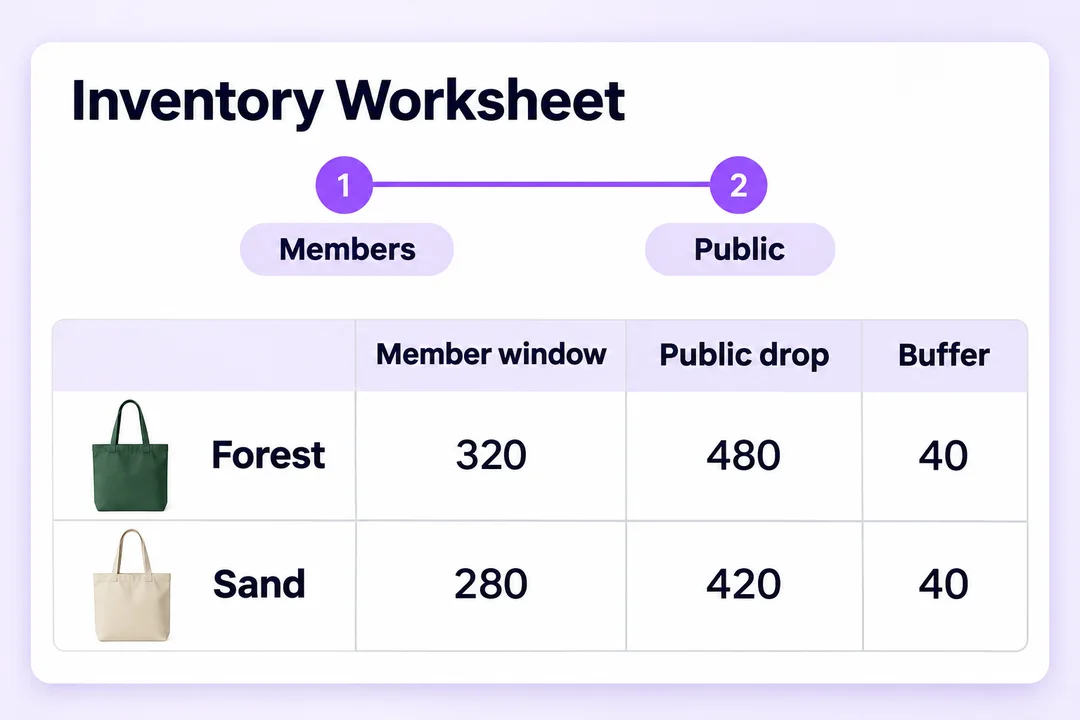
A fictional apparel store plans a 12-hour member window before the public launch. It holds back 40 units of each color for exchanges or stock discrepancies. It has already excluded committed orders from the available column.
| Variant | Available before extra buffer | Extra buffer | Public allocation | Early-access cap |
|---|---|---|---|---|
| Forest | 840 | 40 | 480 | 320 |
| Sand | 740 | 40 | 420 | 280 |
After members buy 300 Forest and 280 Sand totes, Sand reaches its early-access cap. Twenty unclaimed Forest units can roll into the public release after the team reconciles open orders and stock. The public release would then have 500 Forest and 420 Sand units, assuming no stock corrections. The buffers stay outside those figures.
A worksheet is a plan. Check that your storefront actually enforces the early cap before making a public-stock promise. If you can only enforce access, plan a limited preview without promising reserved quantities, or set aside stock through an inventory process you have tested.
Rehearse the member-to-public handoff
- Check all purchase paths. Try a signed-in member, nonmember and guest. Open a direct product link and attempt checkout through the routes your shoppers use.
- Simulate one variant reaching its cap. Confirm what the member sees and who pauses promotion for that variant. Review Shopify’s out-of-stock selling setting before promising a hard limit.
- Reconcile by location. Include outstanding orders and competing channels such as retail POS. Confirm the planned units are sellable from the fulfillment locations for the public drop.
- Assign the handoff. Have one owner check quantities and remove the access restriction at the stated release time. Verify a public shopper can buy before the public announcement goes out.
Publish the time zone and any purchase limits in the launch message. Use “while stock lasts” if the early allocation can sell out. If an early variant is gone, tell members when they can check again without promising they will get one.
Frequently asked questions
Does gating a Shopify product reserve stock for the public drop?
Treat access and inventory as separate controls. An access rule determines who can buy. Verify how your setup enforces any reserved public quantity.
What if a variant sells out during the member window?
Check whether the member allocation or all sellable inventory ran out. If only the member allocation is gone, leave the public quantity in place and update the member message.
Trusted by Shopify merchants








Put the plan to work
Define the signed-in access rules using the Shopify member-only access guide. If you are evaluating gated benefits for your store, explore Memberply on the Shopify App Store.