
Show member pricing where shoppers choose to buy
Show standard and member pricing on eligible product pages. Let shoppers choose the membership offer, then add the product and membership using your store’s Add to cart button.
Memberply Growth: US$49/month, unlimited members and a 14-day app trial.
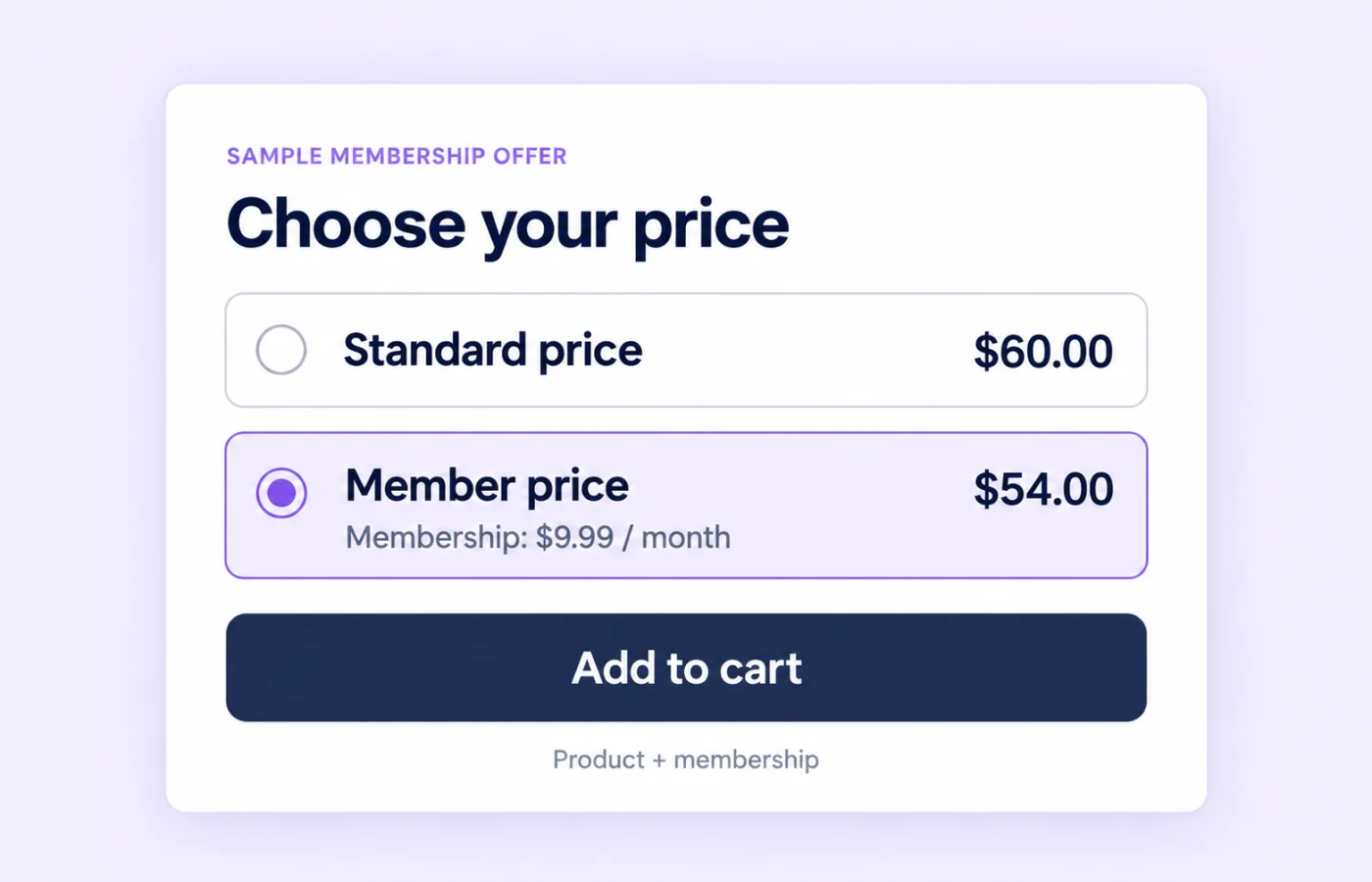
Let shoppers compare standard and member pricing
Memberply’s Product Page Upsell presents a membership offer while a customer is considering an eligible product. A shopper can compare the product’s standard price with its member price and choose to add the membership with the purchase.
This suits memberships where the current product helps explain the value of joining. Use this page to plan the product-page experience; the membership upsells overview compares product, cart and other storefront placements.
Example: product savings and membership fees are separate
On smaller screens, scroll to see every column.
| Choice | Product price | Membership charge today | Total before shipping and tax |
|---|---|---|---|
| Standard purchase | $60.00 | None | $60.00 |
| Join a monthly membership | $54.00 after an eligible 10% discount | $9.99 | $63.99 |
These are illustrative customer prices, not Memberply’s app fee. The member saves $6 on the product, but the membership fee means the combined purchase costs $3.99 more today. Show both amounts and the recurring billing terms clearly rather than suggesting every customer pays less overall.
For a repeat purchaser, ongoing eligible savings and other useful benefits may make joining worthwhile. An occasional buyer may prefer the standard purchase. Judge the offer against actual shopping frequency and benefit costs, not just the discount percentage.
What happens when a shopper selects Member Price?
On smaller screens, scroll to see every column.
| Step | Customer experience |
|---|---|
| Choose Member Price | Select the membership option. Choosing the option alone does not add items to the cart. |
| Use Add to cart | Memberply adds the selected membership if it is not already in the cart, then lets the theme add the product. Existing cart items remain. |
| Review checkout | Shopify calculates eligible discounts and displays the product, membership charge and applicable recurring terms. |
| Complete the purchase | The customer finishes checkout. Verify activation and the availability of each membership benefit separately. |
The membership and product additions are separate steps in the storefront flow. Test the final cart after errors, product unavailability or interrupted requests, as well as the successful purchase path.
Enable Global Product Upsell or use a manual block
- Create your membership tier, select it for storefront upsells and configure a member discount benefit.
- Open Grow > Product Page Upsell in Memberply and select Open Shopify editor for Global Product Upsell.
- Enable Global Product Upsell. Choose a position above or below the product form or buy buttons.
- Adjust the offer content and styling, save the theme settings and test your product templates.
For a specific template needing different placement or styling, add a manual Product Page Upsell app block in the theme editor. A manual block takes priority over the global embed on that page, preventing a duplicate global widget.
If the standard positions do not fit your theme, Custom (advanced) supports a CSS selector. Follow the product page setup guide and upsell tier selection guide.
Discount eligibility and existing members
Configure member discounts to create the member price. Product and collection exclusions, minimum requirements and other benefit conditions still apply. Excluded products should not display a member-price offer for that discount.
When a signed-in customer is recognized with a matching membership tier in the pricing response, the widget uses that member’s tier and removes the standard-price choice. It does not add that same membership again. Customer recognition depends on sign-in and available membership information, so test both new shoppers and existing members.
The widget also checks whether the selected membership variant is already in the cart before adding it. This purchase flow is not a substitute for membership access rules or rejoin eligibility.
Explain what joining costs now and later
The membership price and selling plan come from the selected tier. When both monthly and annual plans are available, this flow uses the monthly plan first. Do not present the widget as a monthly-versus-annual plan selector.
Check the signup charge, renewal price, billing date and cancellation terms at checkout. A joining fee may remain payable during a trial, and an annual-only trial does not make a monthly membership free. The merchant app trial and a customer membership trial are separate offers.
Keep custom offer text aligned with your membership tier settings. Avoid promising that all credit, rewards or access benefits are available as soon as someone selects Member Price. Eligibility and activation timing depend on each benefit.
Test your theme and purchase buttons
Test the product templates and purchase paths your store actually uses, including variant changes, quantity changes, mobile layouts and any other subscription widget. The standard-price row can be omitted when another subscription widget is detected, so the final presentation may differ from the example.
Do not assume a successful Add to cart test proves every accelerated checkout, sticky button, quick-buy form or page-builder layout behaves the same way. Verify each path that customers use, including the membership selling plan and final checkout totals. Ask Memberply support about your setup when placement or button behavior needs checking.
If you want to offer membership later in the journey, use VIP Checkout+ near cart checkout controls or Cart Page Upsell for a larger cart-page card.
App pricing is separate from your membership offer
Memberply Growth costs US$49/month, with unlimited members, a 14-day app trial and no Memberply transaction fee. Check the Shopify App Store listing.
You choose the membership price customers pay. Include benefit costs, Shopify charges, payment processing and fulfilment when evaluating your program. Use the paid membership launch guide to plan the offer beyond its product-page presentation.
What to verify during your app trial
On smaller screens, scroll to see every column.
| Check | What to verify |
|---|---|
| Product pricing | Eligible and excluded products, variants and quantities show the intended offer. |
| Customer states | Guest, signed-in non-member, existing member and membership already in cart behave correctly. |
| Purchase paths | Your normal and accelerated buttons carry the intended items and selling plan to checkout. |
| Billing and benefits | The charge today, recurring terms, discounts and post-purchase benefit availability match your offer. |
Measure completed membership purchases alongside overall product checkout completion and the cost of benefits. More offer clicks alone do not demonstrate higher profit or better retention.
Product page membership upsell questions
Can I show standard and member pricing on Shopify product pages?
Yes. Product Page Upsell can display both options for eligible products using your selected membership tier and configured member discount. The layout can differ for existing members or when another subscription widget is detected.
Does selecting Member Price add the membership immediately?
No. Selection prepares the offer. The shopper then uses the normal Add to cart button, which lets Memberply add the membership before the theme adds the product.
Will existing members be asked to buy the same membership again?
When a signed-in customer is recognized with a matching membership tier, the widget uses that tier and does not add the same membership again. Test sign-in and customer recognition in your store.
Does member pricing apply to every product?
No. Product and collection exclusions, minimum requirements and other discount conditions still apply. Check eligible and excluded products before publishing.
Should I use Global Product Upsell or a manual block?
Use Global Product Upsell for centrally managed placement across product templates. Use a manual Product Page Upsell block when a template needs different placement or styling; it takes priority on that page.
Can customers choose annual billing in this widget?
The flow uses the monthly selling plan first when the selected tier offers both monthly and annual billing. It is not a billing-frequency selector.
Is the member price the total amount due today?
No. It is the eligible product price. A membership fee, joining fee, shipping or tax can also be due. Show membership charges and recurring terms clearly.
Does this work with every theme and checkout button?
Compatibility depends on your theme and purchase controls. Test product templates, mobile, variants, other subscription widgets and each normal or accelerated purchase path you use.
Merchant proof
Merchants use Memberply to launch practical membership programs
Real reviews point to the same conversion concerns: clear value, native store features, sensible pricing and responsive support.
"The app is great and does exactly what i need it to. It is well priced and Doug is so great."
Olverum Official Store
United Kingdom
"Works with Shopify's native store credit and checkout. Their pricing is fair, and their support is legendary."
Puzzery
Canada
"Our store is based in Argentina so we don't have access to Shopify Payments... Memberply solved it."
Elemental Outfit
Argentina
Show the value of joining beside your products
Test your product-page membership offer with a 14-day app trial.