
Turn product and cart visits into membership offers
Show shoppers the value of joining while they browse and buy. Compare product-page offers, cart upsells, VIP Checkout+ and the floating perks widget.
Memberply Growth: US$49/month, unlimited members and a 14-day app trial.
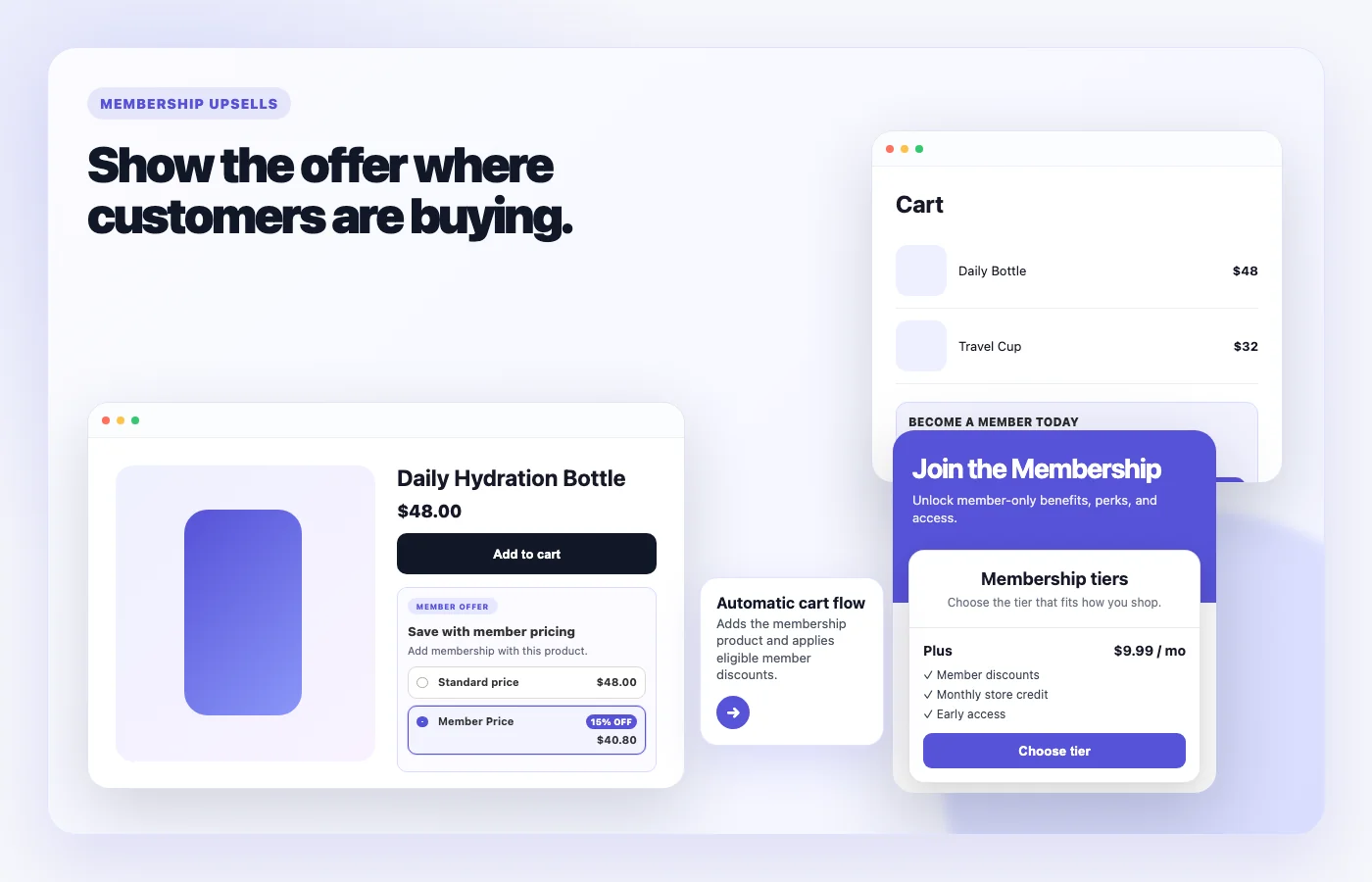
Choose an upsell that sells your membership
Memberply’s storefront upsells promote a membership tier and its benefits while customers shop. Use them when joining can offer relevant member pricing, shipping benefits or other ongoing value. The membership product is added to Shopify checkout so customers can review its price and recurring terms.
This page compares where to present the offer. The individual feature guides explain each placement in more detail. Start with the part of your storefront customers actually use, then test the complete purchase journey before adding more placements.
Compare membership upsell placements
On smaller screens, scroll to see every column.
| Placement | Where it appears | Customer action |
|---|---|---|
| Product Page Upsell | On product pages, near the product form or buy buttons. | Select Member Price, then use the normal Add to cart button to add the product and membership. |
| VIP Checkout+ | Alongside checkout on cart drawers and full cart pages. | Add the selected membership to the existing cart and continue to Shopify checkout. |
| Cart Page Upsell | A larger promotional card on the full cart page. | Select Join Now to add the membership to the cart. |
| Floating Membership Widget | A floating storefront badge that opens a perks panel. | Explore enabled tiers, pricing and benefits, with sign-in for existing members. |
For a store built around a cart drawer, start by evaluating VIP Checkout+. The Cart Page Upsell block does not appear inside a drawer. A floating widget helps customers explore the wider program, while a product-page offer can explain a saving beside the item they are considering.
Product-page member pricing and Add to cart
Selecting Member Price prepares the membership offer. It does not add anything until the customer clicks the store’s normal Add to cart button. Memberply then adds the selected product and membership while keeping existing cart items.
Enable Global Product Upsell to manage placement across product templates. Use a manually placed Product Page Upsell block when a particular template needs different positioning or styling. The manual block takes priority so the global embed does not add a duplicate widget.
Select an enabled upsell tier and configure its Member Discount benefit before promoting member pricing. Product and collection exclusions still apply; excluded products should not display the member-price offer. Follow the product upsell setup guide.
Choose the right cart experience
VIP Checkout+ adds an alternative membership checkout button while keeping the normal checkout available. Accepting it adds the upsell membership and continues to Shopify checkout. Cart Page Upsell is a promotional card for the full cart page.
You can enable both. With automatic placement, Memberply keeps the card on the full cart page and avoids adding VIP Checkout+ there as a second offer, while still showing VIP Checkout+ in the drawer.
Custom placement is different: its selector replaces automatic placement and can override the full-cart duplicate check. If the cart page already has the promotional card, avoid targeting that same area with a custom VIP Checkout+ selector. See the cart upsell setup guide.
Use the floating widget for tier discovery
The floating Perks badge opens a panel showing enabled membership tiers, prices and benefits. Existing members have a sign-in link, and an active member’s current tier appears first and is marked as current.
Unlike the selected tier used for product and cart upsells, the widget presents your enabled tiers. It needs at least one enabled tier and remains hidden when no tiers are available or membership data cannot load.
Use a membership landing page for the fuller explanation of benefits, renewal terms and exclusions. The widget helps shoppers discover that offer without hunting through your navigation.
Check eligibility and the real checkout saving
Enabled member discounts apply to eligible products when Shopify recalculates the cart. Exclusions, minimum requirements and other discount rules still matter. Free shipping applies only when its conditions are met and shipping rates are calculated, normally at checkout.
VIP Checkout+ hides its offer when the cart already contains a membership or the signed-in shopper is already a member. The upsell flows also prevent the same membership being added twice. The floating widget has a different role and can remain useful to existing members.
A rejoin cooldown can require the customer to sign in before accepting the offer. After sign-in, the customer returns to the storefront and can select it again. Do not assume an upsell overrides rejoin restrictions or makes every member-only benefit available before the membership purchase is completed.
Illustrative example: 15% off an eligible $48 product saves $7.20. If joining costs $9.99 today, the product and membership total $50.79 before tax, shipping or other adjustments. Show the membership charge alongside the product saving; a discounted product does not necessarily mean a lower total today.
Present the trial, joining fee and renewal price together
A free member trial can reduce the initial membership fee, but any configured joining fee is still charged once at signup. Do not describe signup as no charge today when a joining fee applies.
A one-year trial applies to annual billing. On a tier offering both monthly and annual billing, the default monthly upsell retains its regular monthly price. Verify the actual purchase option shown to customers before promoting an annual-only offer.
Membership pricing for VIP Checkout+ loads from Memberply; it is not a price typed manually into the theme button settings. Review membership billing and trial options and test the price, first payment and renewal terms all the way through checkout. The merchant’s 14-day Memberply app trial is separate from trials offered to members.
Theme and cart-drawer compatibility
Enable the relevant app embed or block in the theme you intend to publish. A setup enabled only in a draft theme does not appear on the live storefront. Check product templates, the full cart page and cart drawers separately.
VIP Checkout+ automatically looks for checkout buttons. If your theme or cart app uses a different structure, a custom placement selector can target a matching element. This is placement support, not a guarantee that every cart app or theme works without testing. Elements inside an iframe or shadow root cannot be targeted by that setting.
Test drawer opening, quantity changes, removing products and returning from checkout. Theme or cart-app markup changes can require a placement adjustment. If a custom selector is invalid or matches nothing, the custom offer is not inserted and normal checkout remains available.
Membership upsell app pricing and costs
Memberply Growth is US$49/month, with unlimited members, a 14-day app trial and no Memberply transaction fee. Check the Shopify App Store listing. This is the merchant app subscription, separate from the membership price your customers pay.
Budget for the member discounts, credit, shipping and other benefits you fund, plus applicable Shopify and payment-provider charges. Use the paid membership launch guide to connect the upsell message with an offer you can sustain.
What to test before publishing
On smaller screens, scroll to see every column.
| Test | What to confirm |
|---|---|
| Selected tier | An enabled and purchasable tier is selected for product and cart upsells. |
| Offer placement | The intended product template, full cart page and drawer show the correct offer on desktop and mobile. |
| Cart behavior | Existing items stay in the cart, the correct product variant is added and membership is not duplicated. |
| Discount rules | Eligible, excluded and mixed carts show the expected saving and minimum requirements. |
| Payment terms | The initial charge, joining fee, selected frequency and renewal price match your message. |
| Customer states | New shoppers, existing members and customers in a rejoin cooldown see the appropriate flow. |
| Theme updates | Drawer refreshes and normal checkout continue to work after placement changes. |
Measure completed membership purchases alongside overall checkout conversion and funded benefit costs. A higher button-click rate alone does not establish that an upsell improved revenue or profit.
Shopify membership upsell questions
Which Shopify membership upsell should I use in a cart drawer?
Use VIP Checkout+ for an offer alongside checkout in a cart drawer. The Cart Page Upsell block is a larger promotional card for the full cart page and does not appear in drawers.
Can product-page upsells add the product and membership together?
Yes. Selecting Member Price prepares the offer; clicking the normal Add to cart button adds the selected product and membership while preserving existing cart items.
Can I use VIP Checkout+ and Cart Page Upsell together?
Yes. Automatic placement avoids a second VIP Checkout+ offer on a full cart page containing the Cart Page Upsell block. Custom placement can override that duplicate check, so configure its target carefully.
Does the membership upsell discount every product?
No. The enabled Member Discount benefit must meet its rules, including product and collection exclusions and minimum requirements. Test the actual cart and checkout saving.
Will a member trial always mean no charge today?
No. A joining fee remains payable at signup when configured. Annual-only trial offers also do not make the default monthly upsell free.
Does the floating widget show only the upsell tier?
No. It displays enabled tiers with their prices and benefits. Product and cart upsells use the selected upsell tier.
Does VIP Checkout+ replace normal checkout?
No. It adds an alternative membership checkout option while keeping the normal checkout available.
Will every theme and cart drawer work without setup?
Do not assume so. Test your theme and cart drawer. VIP Checkout+ can use a custom placement selector when automatic placement does not find the intended checkout area.
Merchant proof
Built for merchants creating paid membership revenue
Real reviews point to the same things merchants care about: native store features, practical pricing and support when launching a membership program.
"The app is great and does exactly what i need it to. It is well priced and Doug is so great."
Olverum Official Store
United Kingdom
"Works with Shopify's native store credit and checkout. Their pricing is fair, and their support is legendary."
Puzzery
Canada
"Our store is based in Argentina so we don't have access to Shopify Payments... Memberply solved it."
Elemental Outfit
Argentina
Put your membership offer in the shopping journey
Compare placements and test your storefront with a 14-day app trial.