
Launch a paid membership on Shopify
Build an offer customers can understand and your store can sustain. Work through a membership example, check the setup requirements and test the full member experience before launch.
Memberply Growth: US$49/month, unlimited members and a 14-day app trial.

What is a paid membership program on Shopify?
A paid membership charges customers for an ongoing package of access, savings or other benefits. A membership app connects the purchase to the customer’s tier and eligibility. Choose this model when customers are buying membership value; use a product-subscription setup when the main promise is recurring deliveries.
Start with the worked example, check what you need to configure, review app fit and costs, then follow the trial walkthrough.
Planning for an established retailer? See the Shopify Plus membership example and team launch checks.
Strategy first
Start with the membership promise
Before choosing an app or setting a price, define why a customer would pay to join. The offer should be easy to explain in one sentence and specific enough that shoppers can understand the value before checkout.
A useful structure is: "Join our membership to get [benefit customers already want] every [month, order or season]." Store credit, free shipping, member discounts and exclusive access are easier to understand than vague loyalty language. If you are comparing models, read the membership program examples guide. If you are framing the offer as loyalty rather than access, read the paid loyalty program on Shopify guide. If you already know you want that familiar paid-value-bundle model, read the Amazon Prime-style Shopify membership guide.
Example promise
Illustrative promise: join our $20 monthly club to receive $20 store credit after each successful payment and 10% off eligible merchandise. Explain exclusions, credit timing and cancellation terms alongside the offer.
Launch checklist for a Shopify paid membership program
Use these steps to move from idea to a live membership offer.
1. Choose the audience
Start with your repeat buyers, VIP customers or category enthusiasts rather than trying to appeal to everyone.
2. Pick the membership model
Use monthly, annual, one-time or free tiers depending on how often members should receive value.
3. Bundle concrete benefits
Combine store credit, discounts, free shipping, points, exclusive products or member-only content.
4. Create the membership product
Use a Shopify membership app like Memberply to sell the membership and connect benefits to customers.
5. Promote while shoppers buy
Show the membership on product pages, cart pages, landing pages and customer account surfaces.
6. Measure retention
Track signups, benefit redemption, repeat orders, churn reasons and store credit usage.
A $20 membership example: customer value and merchant costs
Imagine a hobby store offering a $20 monthly membership with $20 fee-to-store-credit after a successful payment and 10% off eligible merchandise. This is an illustrative offer, not a recommended price or a customer result. Assume the first-charge credit option is enabled, payment and credit are both USD, and the customer uses all $20 credit on a later eligible $60 order.
On smaller screens, scroll to see every column.
| Step | Calculation | Meaning |
|---|---|---|
| Membership payment | $20 paid; $20 credit granted | The credit replaces part of a later checkout payment. It is not an extra $20 of customer savings on top of the fee. |
| Eligible merchandise | $60 × 10% = $6 discount | $54 remains before credit. This example excludes taxes and assumes no shipping charge to the customer. |
| Credit redemption | $54 − $20 = $34 paid at checkout | Across joining and this order, the customer pays $20 + $34 = $54 for $60 of merchandise. Their cash saving is $6. |
| Illustrative merchant costs | $24 goods + $4 fulfillment + $1.50 payment processing = $29.50 | These are hypothetical combined costs for the membership payment and merchandise order, not Shopify rates or typical margins. |
| Amount remaining | $54 − $29.50 = $24.50 | Before the monthly app fee, other overhead, acquisition costs, taxes, returns and support. This is not net profit or an accounting treatment. |
If the same shopper would otherwise buy the same $60 basket with the same assumed costs, the amount remaining would be $30.50. The membership reduces that by $6 in this example. To justify the offer, you need evidence that joining changes purchase behavior enough to cover its cost; collecting a membership fee does not establish incremental profit.
Model customers who redeem every credit grant, those who buy infrequently and those who cancel. At 100 successful $20 membership payments, you would issue $2,000 of credit at face value. Track issued, redeemed and outstanding credit separately. Do not count a redeemed credit twice after already reducing the checkout cash collected.
In Memberply, fee-to-credit follows successful membership payments; the first charge has its own setting. Loyalty Drops issue a configured amount on a separate schedule. Use the trigger that matches the promise. For broader planning, see program costs and membership pricing strategy.
Check these requirements before publishing a paid tier
On smaller screens, scroll to see every column.
| Requirement | What to configure or confirm |
|---|---|
| Recurring payments | Confirm that your store, gateway and customer payment method support the recurring membership you plan to sell. Check gateway availability for your region; do not assume every one-time payment method can renew. |
| Tier and cancellation policy | Set the price, billing frequency, benefits and cancellation timing. Memberply locks the price and billing frequency after publishing; a different price or frequency requires a new tier. |
| Membership product and theme | Keep the Memberply Subscription Details block on the membership product. Enable the Membership selling plans app embed for recurring products, including quick add and quick view paths. |
| Customer account navigation | Add the Memberply benefits page to the active Shopify checkout and accounts configuration, save it, and add it to the account menu. Test with an actual member login. |
| Credit delivery | Enable Shopify store credit for the native account experience. Memberply’s documented flow delivers credit when the customer logs in. Legacy customer accounts use discount codes in the member portal instead. |
| Restricted access, if offered | Install the required theme components and synchronize exclusive-product checkout protection. Page restrictions run in the browser and do not secure direct file or video URLs. |
Sources and setup steps: Shopify subscription payment requirements, Shopify cancellation policy setup, Memberply tiers, selling-plan embed and customer account setup.
The worked example assumes native credit on a later merchandise order. Verify discount eligibility and combination settings in your checkout; do not assume a legacy discount-code flow behaves identically. Review fee-to-credit delivery and content restriction options if those benefits are central to your offer.
When Memberply fits, and what to budget
Memberply fits stores selling membership access and benefits such as discounts, store credit and restricted products. Its Growth app plan is US$49/month with unlimited members, a 14-day app trial and no Memberply transaction fee. Shopify charges, payment processing, benefit costs and any additional services are separate. The app trial is for the merchant; it does not automatically give customers a free membership. Check the current listing.
If your main requirement is recurring shipments, product swaps or box fulfillment, evaluate a product subscription app. If you only need a password or customer-tag restriction, compare dedicated access tools. Memberply’s browser-based page gating alone is not suitable for confidential content or secure downloads.
Use the membership app comparison to evaluate the complete program and the store-credit app comparison if credit is your main buying requirement. Budget for configuration, ongoing support and rewards as well as the subscription fee.
A Shopify Plus membership program for an established retailer
A Shopify Plus membership program starts with the same question as any paid club: will the intended customers use enough benefits to justify joining? For an established retailer, also agree how ecommerce, store staff and CRM teams will support the offer. Start with repeat buyers whose purchase habits fit the benefit, then test the complete journey before a wider launch.
Illustrative offer: $120 a year for 10% off eligible merchandise
Imagine a retailer with an online store and Shopify POS locations considering a $120 annual membership with 10% off eligible merchandise. This is a planning example, not a recommended price or customer result. Assume USD, no overlapping promotions, no other benefits, and spending measured before the member discount, excluding taxes and shipping. The membership fee itself is excluded from the discount.
- Customer break-even: $120 ÷ 10% = $1,200 of eligible annual spending to recover the membership fee through discounts alone.
- Frequent buyer: $1,500 of eligible spending gives $150 in discounts, leaving a $30 saving after the $120 fee.
- Occasional buyer: $600 of eligible spending gives $60 in discounts, leaving the customer $60 worse off after the fee. That customer may not be a good fit for this offer.
- Merchant check: at $1,500 of eligible spending, the $120 fee is $30 less than the $150 discount. If the customer would otherwise make the same purchases at full price, the offer reduces cash collected by $30 before any change in payment fees, app costs, support or returns. It does not establish incremental profit.
Use your own repeat-purchase data and product margins to test the assumptions. Define eligible products, excluded items and promotion combinations before publishing the promise. If you add credit or shipping benefits, include their costs separately using the worked cost example and program cost guide.
Give each team a launch check
- Ecommerce: test joining, the annual billing terms, mobile sign-in, eligible and excluded products, and cancellation timing. Use the customer-account configuration your store will launch with. Confirm the member sees the promised benefit and loses eligibility at the intended time.
- Retail operations: test identifying the member and applying the intended benefit in Shopify POS. If staff will also sell recurring memberships, check Shopify's current POS subscription requirements separately from benefit redemption. Use Memberply's POS guide to plan the staff workflow.
- CRM: list the membership information needed by each destination. Memberply's documented Klaviyo integration syncs membership status and tier properties; it does not change marketing consent. Verify the exact fields rather than assuming reward balances are included. For another destination, review native integrations, outbound events and custom connection scope.
- Program owner: record the test evidence, unresolved limitations and person responsible for each fix. Run a small pilot and compare benefit costs and purchase behavior with a suitable baseline before expanding. Signup volume alone does not prove that the membership is profitable.
When standard Memberply features are enough
Start with the standard app when its membership tiers, configured benefits and documented integrations meet the brief. Using Shopify Plus does not itself require Memberply Enterprise. A custom CRM connection, a member experience beyond the standard setup or a more involved migration may need a separately scoped Enterprise project. Confirm feasibility, deliverables and support before committing.
Use the Shopify Plus app-selection checklist to assess software fit, then the implementation checklist to assign and verify the launch work.
Use the app trial to test the full member journey
Create a small test tier and record the expected outcome at each step. Use an appropriate test-store or payment-testing setup where available. A real checkout on a live store can charge the selected payment method; the merchant’s app trial does not make customer purchases free.
- Join from the storefront. Check the membership price, recurring frequency, first payment and cancellation terms. Try the product page and any quick-add path you plan to promote.
- Open the member account. Sign in, find the benefits menu and confirm the expected tier. Test the account type your store actually uses.
- Receive one benefit. For first-charge fee-to-credit, confirm the setting is enabled and the payment succeeds. Log in to check delivery. Record the amount, currency and any expiry.
- Redeem on a later order. Buy eligible merchandise and verify the discount, credit balance and remaining amount to pay. Compare the checkout result with your written example.
- Check cancellation and access. Confirm whether benefits end immediately or at the paid period’s end. Test an ineligible or expired account on restricted products and pages when offered.
- Confirm renewal and failure handling. Inspect the next billing date, credit trigger and retry settings. If renewal falls beyond the 14-day app trial, arrange a supported test or follow-up verification; do not mark it tested from signup alone.
Save the results before promoting the offer widely. If a check fails, resolve the configuration or confirm the limitation with support. Use the implementation checklist to assign owners and track the remaining launch work.
Benefits that make paid memberships easier to sell
Make the benefits specific enough for customers to evaluate. Start with benefits customers can use quickly, then add longer-term loyalty mechanics.
Shopify store credit
Use signup credit, recurring credit drops, fee-to-credit rewards, cashback and birthday credit. See the store credit program guide.
Simple savings
Offer free shipping, member discounts and spend-tiered discounts.
Reward momentum
Let members earn points and redeem them for credit or rewards.
Exclusive access
Restrict products, collections, locked content, events or partner offers to active members. See the member-only access guide.
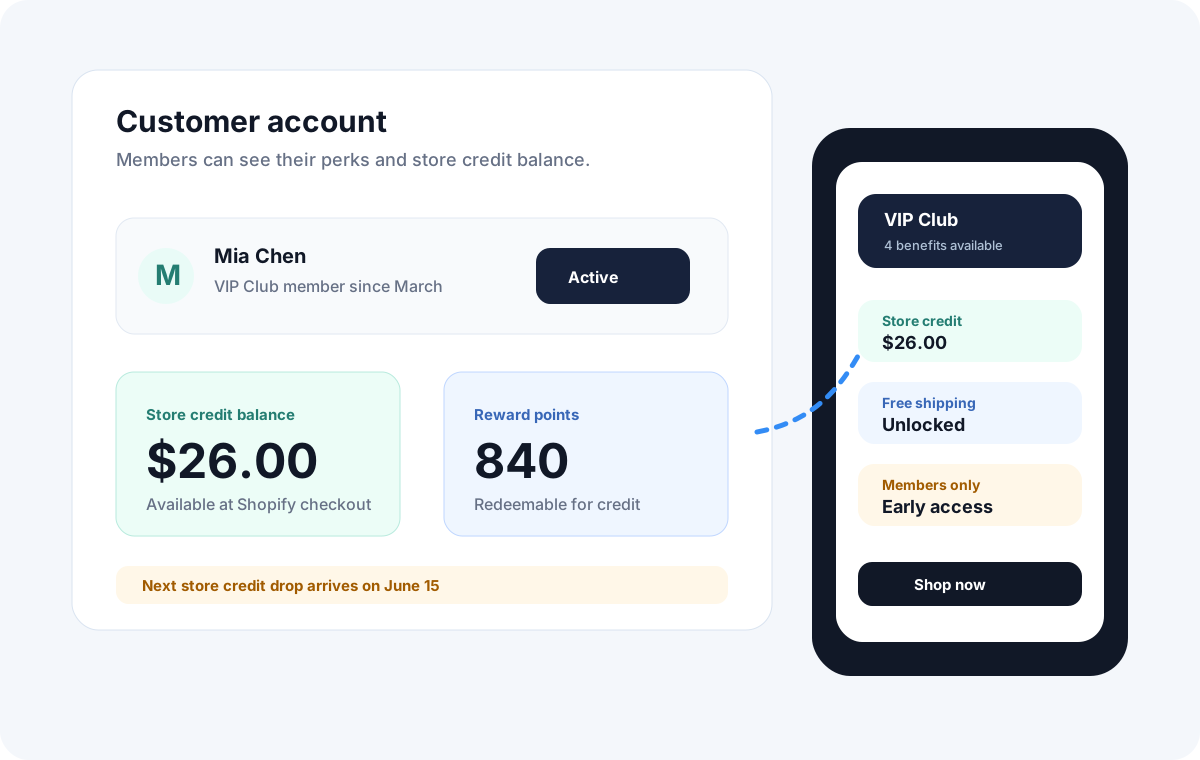
Where to promote your membership on Shopify
Memberships need visibility where shoppers already make buying decisions.
| Surface | What to show | Why it matters |
|---|---|---|
| Product pages | Savings, credit and member price benefits. | Shoppers can compare the membership value before adding to cart. |
| Cart pages | Membership upsell and benefits they unlock today. | Cart intent is high and the benefits are easier to understand. |
| Landing page | Full membership offer, tiers, FAQs and reviews. | Useful for email, ads, social and organic search traffic. |
| Customer accounts | Available credit, points, member status and benefits. | Keeps value visible after the customer joins. |
Common mistakes
What to avoid when launching
Too many benefits at launch
Start with a clear benefit bundle customers can understand. You can add more once the core offer converts.
Hiding the offer on one page
Show the membership on product pages, cart pages and customer account surfaces, not only on a standalone page.
Using points without direct value
Points work better when members know how they turn into store credit, discounts or another useful reward.
Turn the plan into a tested launch
Use the Shopify loyalty program implementation checklist to assign owners, test checkout and rewards, and record launch evidence.
Questions about Shopify paid membership programs
Clear answers before choosing an app and launching your membership.
Can I launch a paid membership program on Shopify?
Yes. Shopify merchants can launch paid membership programs with an app such as Memberply, which supports membership tiers, benefits, store credit, reward points, member portals and storefront promotion.
How do I create a membership program on Shopify?
Create a membership program on Shopify by defining the customer promise, choosing monthly, annual, one-time or free tiers, selecting concrete benefits, using a Shopify membership app to sell the membership, and promoting the offer on product pages, cart pages and customer accounts.
What Shopify membership app should I use for a paid program?
Use a Shopify membership app such as Memberply when customers are paying for access, rewards, store credit, discounts, free shipping, gated products or other member benefits rather than only recurring product delivery.
What should I include in a Shopify paid membership program?
A strong paid membership program should include a clear audience, simple pricing, concrete benefits, a member portal, storefront promotion, retention reminders and a way to measure repeat purchases.
What benefits work well for Shopify memberships?
Useful Shopify membership benefits include store credit, free shipping, member discounts, reward points, cashback, birthday credit, exclusive products, locked content, events and partner offers.
How do I promote a paid membership on Shopify?
Promote the membership where shoppers are already making decisions: product pages, cart pages, landing pages, floating widgets, customer accounts, email and post-purchase flows.
How much does Memberply cost for a paid membership program?
Memberply Growth costs US$49/month with unlimited members, a 14-day app trial and no Memberply transaction fee. Shopify fees, payment processing, benefits and additional services are separate. This app price is different from the membership fee you charge customers.
Does the app trial make customer memberships free?
No. The 14-day app trial applies to the merchant’s Memberply subscription. A customer buying a paid membership can still be charged according to that tier’s checkout terms.
When do members receive fee-to-store-credit?
Credit follows a successful membership payment. You choose whether the first charge receives credit. With Shopify customer accounts, the documented delivery occurs when the customer logs in; legacy accounts receive discount codes instead.
Can members keep benefits after cancelling?
Memberply lets you choose whether cancellation ends benefits immediately or at the end of the billing cycle. Configure the policy before launch and test that access ends at the intended time.
Can I run a paid membership program on Shopify Plus?
Yes. Start with a membership offer that fits your customers, then verify recurring payments, customer accounts, benefit eligibility, Shopify POS workflows and required integrations. Shopify Plus alone does not determine which membership benefits or app features your program needs.
Does a Shopify Plus membership program require Memberply Enterprise?
No. Use standard Memberply features when they meet your requirements. Custom integrations, a tailored member experience or a more involved migration may need a separately scoped Enterprise project. Confirm feasibility and deliverables before committing.
Merchant reviews
Merchants use Memberply to launch practical membership programs
Read what merchants say about using Memberply for their membership programs. Read reviews on the Shopify App Store.
"The app is great and does exactly what i need it to. It is well priced and Doug is so great."
Olverum Official Store
United Kingdom
"Their pricing is fair, and their support is legendary."
Puzzery
Canada
"Our store is based in Argentina so we don't have access to Shopify Payments... Memberply solved it."
Elemental Outfit AR
Argentina
Ready to launch your Shopify membership program?
Install Memberply or compare Shopify membership apps before you build. Explore membership tiers before setting up your program.
Work through your membership plan with Douglas
Buy the course to design your offer, price your benefits and prepare your launch. US$199 once. Course access is arranged personally by email after purchase. Contact us for delivery timing. Memberply software is separate.
Explore the membership course