
Bring members together with events
Publish workshops, previews and meetups for your members. Collect free RSVPs or connect a free or paid Shopify ticket product, with an optional paid or complimentary +1.
Memberply Growth: US$49/month, unlimited members and a 14-day app trial.
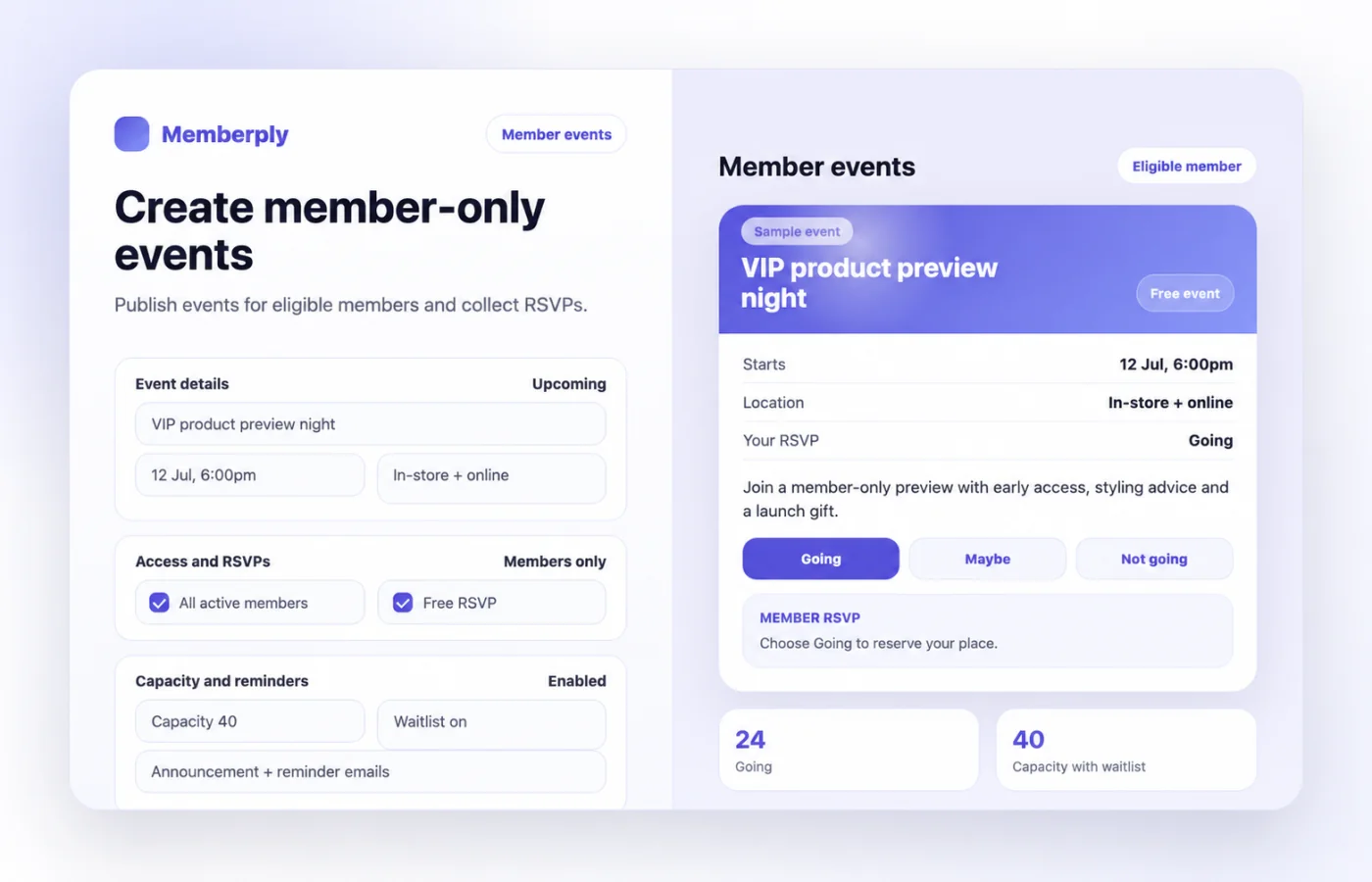
Event access as part of a Shopify membership
Memberply puts events in the Members Area alongside the rest of your membership benefits. Use it when customers join for access to workshops, launch previews, tastings, online sessions or an in-store community.
Choose visibility for all active members or only the event’s membership tier. This is a member-event workflow, with Shopify handling checkout and inventory for paid ticket products. If you need reserved seating, individual ticket scanning or appointment scheduling, verify those requirements separately before choosing your event system.
Free RSVPs or paid tickets?
On smaller screens, scroll to see every column.
| Requirement | RSVP only | Shopify ticket (free or paid) |
|---|---|---|
| How members attend | Select Going in the Members Area. | Complete checkout for the selected Shopify ticket product, including $0 tickets. |
| Interest without commitment | Maybe or Not going. | Maybe or Not going does not count as buying a ticket. |
| Attendance record | Going records the member’s RSVP. | A recorded paid ticket purchase updates the member to Going. |
| Limit places | Use event capacity for Going RSVPs. | Configure Shopify ticket inventory to limit sales. |
Illustrative example: a coffee club could offer a free tasting with 20 member RSVP places, then a separate paid workshop sold through a ticket product. Explain which experience is included in membership and which costs extra. The hero shows a sample free event.
Who can see the event and buy tickets?
Set event visibility to All active members or Only this membership tier. Test with an eligible member, a member on another tier and a visitor without membership before sharing the event.
For a free or paid ticketed event, create a Shopify ticket product and select it using Memberply’s product search. Set its Shopify price to 0 for free admission, then share the product link with members or use it in your event calendar. A manually typed product URL does not provide the product connection used to record attendance. Saving the ticketed event adds its ticket product to that tier’s Exclusive Product Access list.
Event visibility and permission to purchase the ticket are separate checks. In particular, verify ticket access for every intended tier when an event is visible to all members. Follow the exclusive product access setup and confirm checkout protection is synchronized, including direct cart links.
Capacity and waitlists for free member events
Capacity counts members marked Going plus confirmed guests and guests awaiting payment. It limits new free RSVPs and guest bookings. When it is full, members already Going keep their response. Other members can choose Join waitlist when enabled, or still respond Maybe or Not going.
When a Going member changes to Maybe or Not going, a place can open. With waitlist-opening email enabled, Memberply’s background check can notify waitlisted members. An opening email is not an automatic promotion to Going or a guaranteed reserved seat; the member needs to return and respond.
Waitlist checks run in the background on an hourly schedule, so avoid promising an immediate message. For free and paid ticketed events, manage available ticket quantities in Shopify instead of assuming RSVP capacity prevents ticket orders.
What a paid ticket purchase records
When an eligible member’s paid purchase of the connected ticket product is recorded for an upcoming or live event, Memberply marks that member Going. An earlier Maybe or Not going response is updated.
The member attendance record is per member and event. Buying several ticket units does not create separate named guest records. Enable guest places and ask members to use the guest form in their member area to register a named +1. Use a dedicated product for each paid event to keep the purchase-to-event connection clear.
Allow time for order processing. Test pending payments and payment completion using the methods your store accepts, rather than treating a ticket in the cart as a confirmed RSVP.
Let each member bring one paid or complimentary guest
In the event settings, choose no guests, a complimentary guest or a paid guest. Paid guests need a connected Shopify product with one variant, a price above zero and no shipping requirement. Existing stores must grant Memberply the additional Shopify permission shown in the event settings before enabling paid guests.
After confirming their own place, members enter their guest’s name and optional email in either Shopify customer accounts or the legacy member dashboard. Complimentary guests are confirmed immediately. Paid guests receive a separate one-ticket Shopify checkout, and the place is confirmed only after payment is verified. The optional email records contact details; it does not send an invitation or subscribe the guest to marketing.
An unpaid guest checkout holds one event place for 30 minutes from booking. Members see the expiry time and can book again after expiry if space remains. Memberply checks payment and cancels the unpaid checkout before releasing the place. Checks run every minute, and uncertain payment or cancellation status keeps the place reserved. Completed orders, including payments still processing, do not expire. Members can cancel unpaid checkouts from their member area. For completed checkouts, the merchant manages cancellations and refunds in Shopify. Payment status refreshes when bookings are viewed and through background checks. Guests appear alongside their inviting member in the attendee list and CSV, with individual check-in controls.
RSVP changes, ticket refunds and event cancellation
For a free event, changing Going to Maybe or Not going can release a place. Members must cancel an active guest booking before changing their own Going response. For a paid event, changing an RSVP is not a Shopify refund or an inventory adjustment.
Likewise, do not assume refunding a ticket automatically removes the member’s Going response. The purchase-to-RSVP flow records paid purchases; review the attendee list separately after refunds, membership cancellation or other changes.
If you cancel or reschedule an event, review event details, ticket availability, attendee communications and any refunds as separate tasks. Publish a clear cancellation and guest policy before taking payments.
Announcements, reminders and attendee lists
Optional event emails include a new-event announcement, three reminders and waitlist-opening notifications. Set each reminder’s hours before the event, and edit the copy from the Events benefit page or the Emails page. Reminders target the relevant Going members.
Export attendees as a CSV with names, email addresses, RSVP statuses and check-in values. Use the list to plan staffing, supplies and check-in. Check RSVP statuses and paid order quantities separately, especially when a member buys more than one ticket. Online event locations can include your meeting link; this does not mean Memberply hosts the video session.
Set up your first member event
- Open Benefits, choose the tier’s Edit Benefits, then enable and edit Events.
- Select Add event. Enter the title, location, start date and time, optional end time and description.
- Choose member visibility and free or paid entry. Configure free-event capacity and waitlist, or select the paid ticket product.
- Configure notifications, save, and test the member journey before announcing the event.
Follow the event setup guide. Make the meeting location, arrival instructions, included benefits and any extra ticket cost clear in the description.
Member event app pricing and event costs
Memberply Growth costs US$49/month, with unlimited members, a 14-day app trial and no Memberply transaction fee. Check the Shopify App Store listing. Your membership fees and ticket prices are separate from the merchant app subscription.
Budget venue hire, hosts, supplies, staff time, refunds and Shopify/payment fees. A free member event can still cost your business money. For example, supplies at $8 per attendee for 20 attendees cost $160 before venue and staff expenses. This is an illustrative budget, not a customer result.
Use the paid membership launch guide to decide which events belong in the membership and which should be paid add-ons.
What to test during your app trial
On smaller screens, scroll to see every column.
| Check | Confirm before launch |
|---|---|
| Eligibility | Correct tiers see the event and can purchase its ticket where applicable. |
| Free RSVP | Going, Maybe and Not going update the member’s response. |
| Capacity and waitlist | A full free event offers the intended waitlist behavior; an opening requires a fresh response. |
| Paid ticket | Paid checkout for the connected product updates Going after processing; ticket stock controls sales. |
| Changes | Refunds, RSVP changes and cancellations are handled according to your policy. |
| Operations | Event times, location, reminder settings and attendee records support your actual check-in process. |
Find members and guests at the door
Create printable membership cards with a photo, member number and QR code. Set a store-wide card background colour and logo in Memberply settings; new cards and reprinted cards use your saved branding. Scan a card in the dashboard or Shopify POS, review the member and confirm arrival for their booked event. You can also search attendees by name, email or inviting member, filter by check-in status and undo mistakes. A card does not replace an event booking, and repeated scans do not undo check-in. Use the merchant dashboard or the separate Event check-in tile in Shopify POS, with no customer or purchase in the cart. Both use the same attendance records, refreshed every 15 seconds. An internet connection is required; only Going members and confirmed guests can check in.
Set up attendee search and event check-in. Create events and export the full attendee list from the merchant dashboard.
Shopify member event questions
Can I create members-only events on Shopify?
Yes. Memberply shows events in the Members Area for all active members or only the configured membership tier.
Can members RSVP without buying a ticket?
Yes, for RSVP-only events they can select Going, Maybe or Not going. Free and paid ticketed events require a completed Shopify ticket order to be counted as Going.
Does event capacity limit paid ticket sales?
Use Shopify ticket-product inventory to limit paid member ticket sales. Event capacity limits free RSVPs and guest bookings, counting guests awaiting payment, but does not replace Shopify inventory for paid member tickets.
Does the waitlist automatically reserve a place?
No. A waitlist-opening email invites the member to return and respond. It does not automatically promote them to Going or guarantee a reserved seat.
Can I send event reminders?
Yes. Enable optional reminders and set how many hours before the event they should be sent. Memberply also supports event announcements and waitlist-opening emails.
Does refunding a ticket automatically cancel the RSVP?
For member tickets, review the RSVP separately after a refund. For guest tickets booked through the guest form, a full refund or order cancellation releases the guest place when payment status is refreshed. Partial refunds keep the guest confirmed. Changing an RSVP does not issue a Shopify refund.
Does buying multiple tickets create named guest records?
No. Use the Event ticket guest product-page app block to book one member ticket and one named guest together, or add a guest from the member area after confirming attendance. Paid guest tickets can share the member ticket checkout. Extra quantities purchased with the standard buy button do not create guest records. Set up product-page guest booking. The block requires Shopify draft-order permission and ticket products without shipping.
Merchant proof
Merchants use Memberply to launch practical membership programs
Real reviews point to the same conversion concerns: clear value, native store features, sensible pricing and responsive support.
"The app is great and does exactly what i need it to. It is well priced and Doug is so great."
Olverum Official Store
United Kingdom
"Works with Shopify's native store credit and checkout. Their pricing is fair, and their support is legendary."
Puzzery
Canada
"Our store is based in Argentina so we don't have access to Shopify Payments... Memberply solved it."
Elemental Outfit
Argentina
Make events part of your membership
Build and test your first member event with a 14-day app trial.