
Keep your membership perks easy to find
Add a floating Perks button to your Shopify storefront. Let shoppers explore membership tiers, prices and benefits, then visit the membership product page to join.
Memberply Growth: US$49/month, unlimited members and a 14-day app trial.
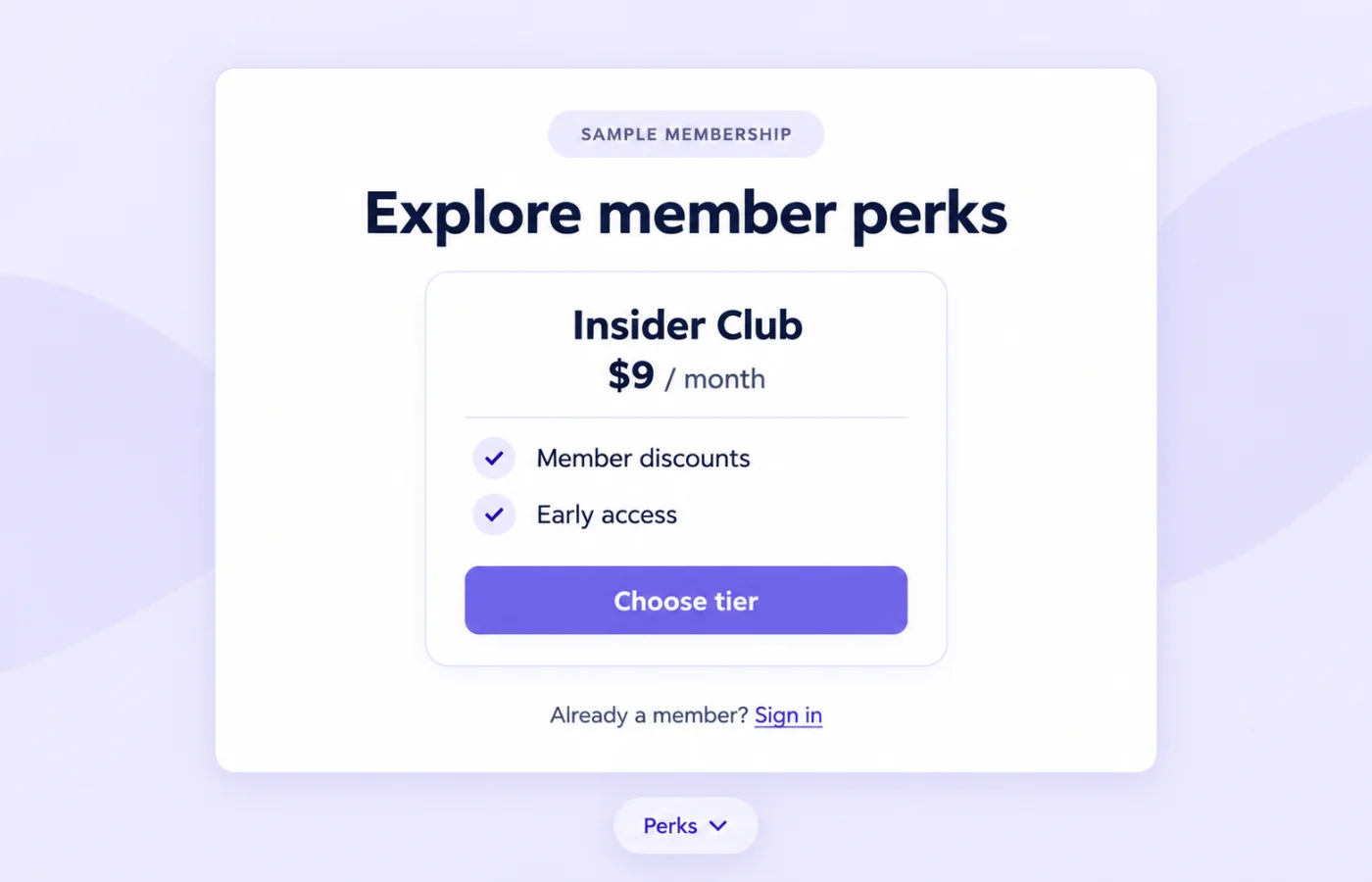
A storefront button for discovering your membership
Memberply’s floating membership widget adds a small button, labeled Perks by default, to storefront pages where the app embed runs. Opening it reveals a membership panel with available tiers, pricing, descriptions and benefit summaries.
Use it to make your program easier to find while shoppers browse. It gives visitors a route to explore and join; the member portal handles the separate member account experience.
From the Perks button to the membership product
On smaller screens, scroll to see every column.
| Action | What the shopper sees |
|---|---|
| Open Perks | A panel showing available membership tiers and their benefits. |
| Compare the offer | Tier names, pricing labels, descriptions and up to four benefit names per tier. |
| Choose tier | A link to that tier’s membership product page, where the shopper can review the offer and purchase options. |
| Sign in | An account sign-in link for returning customers. Recognized members see their available current tier first. |
Choosing a tier does not add it to the cart or complete a purchase. Keep the destination membership product published and its product page ready for signup. The hero’s $9 monthly offer is illustrative merchant pricing, separate from Memberply’s app fee.
Enable the floating membership widget in your theme
- Create and enable a membership tier, add its benefits and publish the membership product to your storefront.
- Open Grow > Floating Widget in Memberply to review the setup checklist and theme editor shortcut.
- In the Shopify theme editor, open App embeds and enable Memberply Floating Membership Widget.
- Set the badge text, panel copy, colours and left or right position, then select Save.
- Test the published theme, open the panel and follow each tier’s link through to its membership product page.
An embed enabled on a draft theme is not automatically enabled on a different published theme. Follow the floating widget setup guide for the current setup steps.
What appears in each membership tier card?
The panel uses enabled, available storefront tiers rather than only the single tier selected for product and cart upsells. Each card can show its name, description, pricing label and up to four enabled benefit names.
Free tiers show Free. Monthly and annual tiers show the amount and billing interval; one-time tiers show the price. A tier offering both monthly and annual billing shows a monthly-or-yearly label, with the purchase details on the membership product page.
Treat the panel as a summary. It does not spell out every trial, joining fee, cancellation term or benefit condition. Make those details clear on the destination page and verify the actual checkout charges. See membership tiers for configuring the underlying offer.
What existing members see
When Memberply recognizes a signed-in customer with membership benefit access, their available current tier appears first and is marked as their current tier. That card uses a status label in place of its Choose tier action. Other available tiers can still appear.
A signed-out visitor is not automatically recognized as a member. The panel includes a sign-in link, so test both guest and signed-in experiences. Do not present another tier’s product link as an automatic membership upgrade, downgrade or billing switch.
The widget explains the program. It does not display a live points balance, redeem credit or manage cancellation within the panel. Link your broader member account experience when customers need those services.
Make the invitation clear and useful
On smaller screens, scroll to see every column.
| Setting | Practical choice |
|---|---|
| Floating badge | Use a short label such as Perks or Membership. |
| Panel copy | Explain who the membership helps, then let the tier cards show the options. |
| Colours | Use readable text and button contrast that fits your storefront. |
| Position | Choose left or right after checking chat, cookie controls and other floating elements. |
For example, a store serving repeat shoppers could describe member savings on eligible purchases. Keep benefit names specific and consistent with your actual settings. A panel summarizing store credit or early access does not mean those benefits are granted just by opening it.
Check mobile placement and the full-screen panel
On desktop, the membership panel opens near the selected side of the screen. On mobile, it opens as a full-screen panel with scrolling for longer content and a close control. The storefront remains behind the panel, but normal page scrolling is paused while it is open.
Test opening, scrolling and closing on a phone, including stores with chat buttons, sticky Add to cart bars and cookie banners. Check that the floating badge remains reachable and that shoppers can return to browsing. Left or right positioning helps you choose a better location; it does not guarantee automatic collision avoidance with other apps.
If the widget or a tier is missing
Check that the embed is enabled on the theme shoppers are using, at least one membership tier is enabled and available to the storefront, and its membership product is published. With no available tiers, the widget stays hidden.
If membership data cannot load, the panel may not open even when the badge is visible. Reload and check again; contact Memberply support if the issue persists. Do not assume that the badge alone proves every tier or signup link is ready.
Follow each Choose tier link in a controlled test. Confirm it reaches the intended membership product and that its pricing and purchase options match the tier.
Use the widget alongside purchase-specific offers
The widget helps visitors find and compare the program. Product Page Upsell shows member pricing beside an eligible product, while VIP Checkout+ can add membership before cart checkout. A membership landing page gives the offer more room for explanation.
Use the membership upsell comparison to choose the placements that fit your store. Keep prices, benefits and billing terms consistent across them.
Your membership prices are separate from the app fee
Memberply Growth costs US$49/month, with unlimited members, a 14-day app trial and no Memberply transaction fee. Check the Shopify App Store listing.
You choose what shoppers pay for membership. The merchant app trial does not make customer memberships free. Use the paid membership launch guide to budget benefits and plan the full signup journey.
What to verify during your app trial
On smaller screens, scroll to see every column.
| Check | What to confirm |
|---|---|
| Discovery | The badge appears on the intended storefront pages and does not clash with other controls. |
| Offer accuracy | Available tiers, pricing labels and benefit names match the membership configuration. |
| Customer journey | Tier links, account sign-in, current-tier recognition and mobile closing work as expected. |
| Completed signup | The destination product and checkout show the intended membership charge and terms. |
Evaluate completed memberships alongside the wider shopping experience. Widget opens and tier clicks can show interest, but they do not establish additional revenue or better retention.
Floating membership widget questions
What is a Shopify floating membership widget?
It is a storefront button that opens a panel with available membership tiers, pricing labels and benefits. Memberply uses Perks as the default button label.
Does Choose tier add the membership directly to cart?
No. It links to the membership product page so the shopper can review the offer and purchase options.
Does the widget show only my selected upsell tier?
No. It uses enabled, available storefront membership tiers rather than only the tier selected for product and cart upsells.
How many benefits appear for each tier?
The panel displays up to four enabled benefit names per tier. Use the membership product page to explain the full offer and conditions.
What do existing members see?
When a signed-in member is recognized, their available current tier appears first and is marked as their current tier instead of showing its Choose tier action. Other tiers can still appear.
How does the widget work on mobile?
The floating badge opens a full-screen panel with scrolling and a close control. Test it alongside chat, sticky purchase controls and cookie banners.
Why is my membership widget hidden?
Check the published theme’s app embed, enabled and available tiers, and membership product publication. No available tiers hides the widget; data-loading problems can also prevent the panel opening.
Can customers redeem rewards inside this widget?
No. This panel is for membership discovery and tier links. Use the member account experience for supported reward and membership-management actions.
Merchant proof
Merchants use Memberply to launch practical membership programs
Real reviews point to the same conversion concerns: clear value, native store features, sensible pricing and responsive support.
"The app is great and does exactly what i need it to. It is well priced and Doug is so great."
Olverum Official Store
United Kingdom
"Works with Shopify's native store credit and checkout. Their pricing is fair, and their support is legendary."
Puzzery
Canada
"Our store is based in Argentina so we don't have access to Shopify Payments... Memberply solved it."
Elemental Outfit
Argentina
Make your membership easier to discover
Test the floating membership widget with a 14-day app trial.