
Connect membership events to your systems
Send membership changes to a receiving endpoint for your CRM, automation tool or custom backend. Choose events, verify delivery and build the actions your business needs.
Memberply Growth: US$49/month, unlimited members and a 14-day app trial.
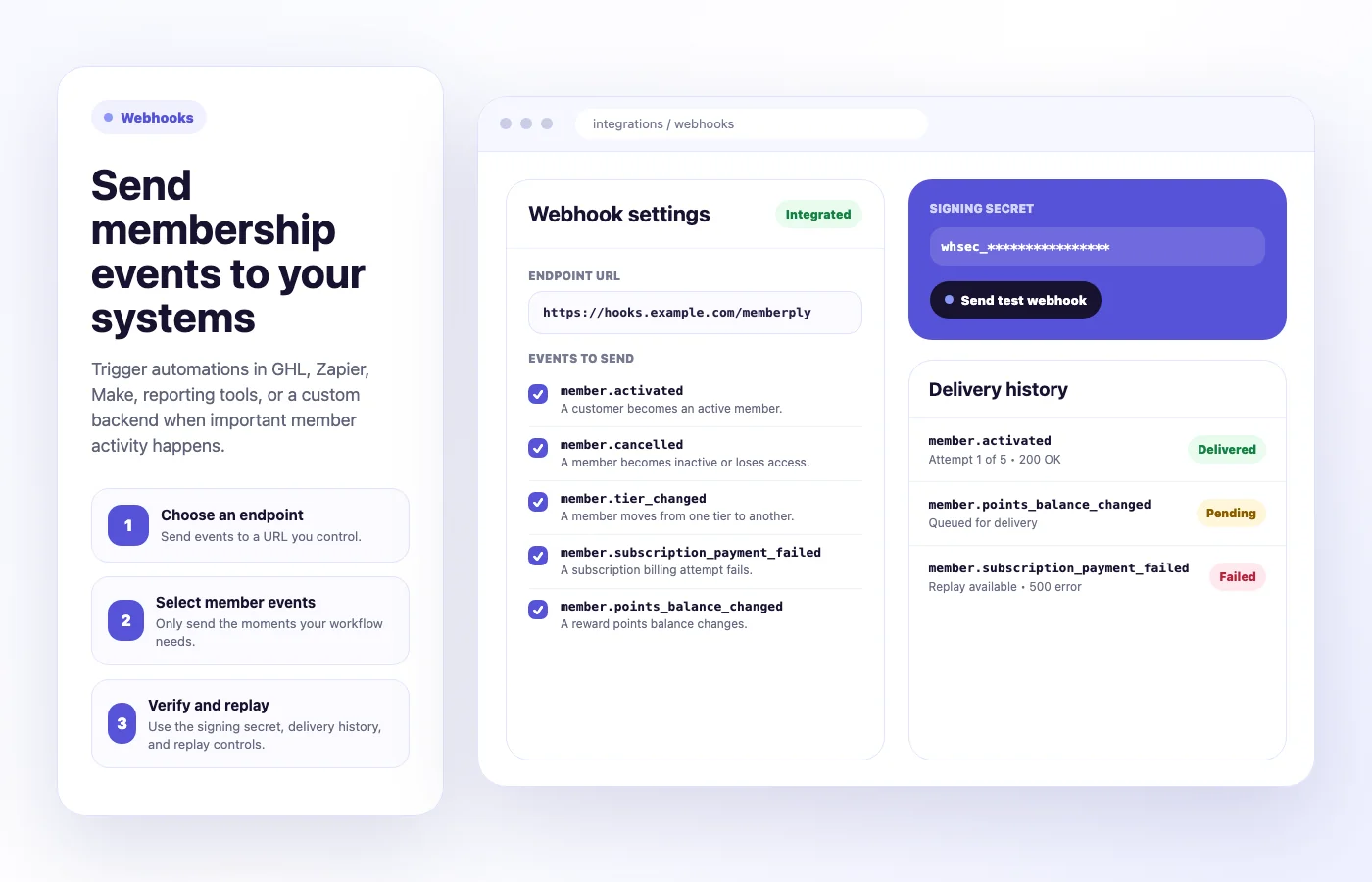
Can Memberply connect to your CRM or automation workflow?
Yes, through outgoing webhooks. Memberply sends selected membership events as JSON to an endpoint you configure. Your receiving system decides what to do with the data, such as updating a CRM record or creating an internal task.
This is a configurable webhook connection. It does not install a native connector, build a workflow in another platform or provide a two-way membership API. Confirm that your destination can receive the request and map the fields your workflow needs.
Which membership events can you receive?
On smaller screens, scroll to see every column.
| Event | Meaning and scope |
|---|---|
member.activated | Membership activation or an active-membership update emitted by a supported membership flow. Do not treat every delivery as a unique first purchase. |
member.cancelled | A supported membership change marks the member inactive or removes access. |
member.tier_changed | A member moves to another tier; extra data identifies the previous tier. |
member.subscription_payment_failed | A membership subscription billing attempt fails. This does not by itself mean access has ended. |
member.points_balance_changed | The supported points-redemption flow emits the balance change. Do not assume every earning or manual adjustment sends this event. |
These are the five selectable events. A scheduled future cancellation is different from becoming inactive; do not assume a separate scheduled-cancellation webhook is available. Verify the specific member action your workflow depends on during setup.
Practical membership automation examples
On smaller screens, scroll to see every column.
| Member event | Action you could configure | Check before using it |
|---|---|---|
| Activation | Update the member’s status in your CRM. | Match the correct customer and avoid creating duplicate records. |
| Tier change | Update a tier field used by your service team. | Map the new tier and handle repeated or delayed deliveries. |
| Payment failure | Create an internal follow-up task. | Keep it separate from payment retry and access rules. |
| Cancellation | Mark the membership inactive in an external system. | Confirm access has actually ended before taking an irreversible action. |
These are illustrative workflows you build in the destination, not actions Memberply installs automatically. An incoming-webhook URL from your automation platform or middleware may be suitable if it supports the request, signature checks and required field mapping.
What data does the webhook contain?
Each payload includes an event id, event_name, occurred_at, the shop and a data object. The member data can include customer identifiers and contact details, membership tier and status, and recorded points and order metrics. Event-specific details appear in extra.
Treat these values as a snapshot from Memberply’s recorded data, not a complete customer export or a promise of real-time store-wide analytics. Only map fields needed by your workflow. The webhook integration guide contains the payload and request-header reference.
Use the payload’s event ID to prevent processing the same event twice. A retry or replay can deliver the same payload again. Different events can still concern the same customer, so make the receiving action safe to repeat where appropriate.
Set up and test your receiving endpoint
- Prepare an endpoint that accepts POST requests with a JSON body. Use HTTPS for the receiving service.
- Open Integrations > Webhooks in Memberply, enter the endpoint URL and choose the events.
- Select Save settings, then copy the signing secret securely into your receiver configuration.
- Use Send test webhook and inspect the received payload and delivery history.
- Test the real member actions your workflow needs before enabling downstream actions for customers.
Memberply sends X-Memberply-Event and X-Memberply-Signature. The signature is a lowercase hexadecimal HMAC SHA-256 value calculated from the raw request body using the signing secret as a UTF-8 string. Your receiver should verify it before acting. Regenerating the secret requires updating the receiver.
A successful endpoint test checks delivery. It does not prove that your CRM mapping, email permissions or downstream business action is correct.
Retries, delivery history and replay
Memberply queues deliveries before sending them. A 2xx response marks delivery successful. A timeout or non-2xx response can trigger another attempt, up to five attempts total, including the first attempt.
On smaller screens, scroll to see every column.
| Failed attempt | Delay before the next attempt |
|---|---|
| First | 1 minute |
| Second | 5 minutes |
| Third | 30 minutes |
| Fourth | 2 hours |
The worker checks due deliveries every 10 seconds by default. These are scheduling intervals, not a guaranteed delivery time. Inspect the history for pending, delivered or failed status, attempt count, last response or error, and next retry.
Replay queues the original payload again with the same event ID. It does not rebuild the event from the customer’s latest state. After changing an endpoint or signing secret, test delivery again rather than assuming older queued items have migrated to the new setup.
A delivered status means the endpoint returned success. It does not confirm that a later action in another platform completed. Monitor the receiving workflow too.
Webhooks or a built-in integration?
Choose webhooks when you need selected membership events to drive a custom workflow and can configure the receiving side. Choose Klaviyo or Omnisend when their documented membership contact-property sync fits your email segmentation needs.
For supported welcome and expiry messages, native member emails may already handle the task. Outgoing webhook data alone does not subscribe a customer to marketing or authorize a recipient system to send messages.
Budget for the app and your receiving workflow
Memberply Growth costs US$49/month, with unlimited members, a 14-day app trial and no Memberply transaction fee. Check the Shopify App Store listing.
Any automation-platform plan, receiving infrastructure or developer work is separate. Confirm the destination’s webhook support and usage limits before choosing it. See the paid membership launch guide for planning the wider offer.
What to verify during your trial
On smaller screens, scroll to see every column.
| Check | Confirm before relying on it |
|---|---|
| Event coverage | Your exact activation, tier change, cancellation, failure or redemption action produces the expected event. |
| Payload mapping | The customer and tier identifiers match the right external record. |
| Signature and duplicates | Invalid signatures are rejected, and the same event ID cannot repeat the business action. |
| Failure handling | A controlled receiver failure appears in history, retries work, and replay is safe. |
| End-to-end result | The intended downstream action completes, with its own errors monitored. |
Membership webhook questions
Does Memberply support Shopify membership webhooks?
Yes. It sends five selectable membership event types to a configured receiving endpoint as JSON POST requests.
Is this a native CRM or automation-platform connector?
No. You configure an incoming-webhook endpoint and build the receiving workflow. Memberply does not automatically create mappings or actions in the other system.
Can webhooks update Memberply from another system?
This integration sends outgoing events. It is not a two-way sync or a replacement for a full public API.
How many times does Memberply retry a failed webhook?
A delivery can have five attempts total, including the first. The delays before the remaining attempts are 1 minute, 5 minutes, 30 minutes and 2 hours.
How do I prevent duplicate actions?
Store the payload event ID and check it before processing. Retries and replays can send the same event again, so the receiver must handle duplicates.
Does Replay send the latest membership data?
No. Replay queues the original payload with the same event ID. It does not rebuild a fresh snapshot of the member.
Does every points change send a webhook?
Do not assume that. The verified points event is emitted by the supported redemption flow. Test the exact action you need rather than relying on all earnings or manual adjustments.
Does Delivered mean my whole workflow succeeded?
No. It means the endpoint returned a successful 2xx response. Check the receiving platform to verify subsequent actions.
Merchant proof
Built for stores that want membership revenue without heavy setup
Trust helps technical features convert too. Reviews make the page feel less theoretical and give merchants more confidence to install the app.
"The app is great and does exactly what i need it to. It is well priced and Doug is so great."
Olverum Official Store
United Kingdom
"Works with Shopify's native store credit and checkout. Their pricing is fair, and their support is legendary."
Puzzery
Canada
"Our store is based in Argentina so we don't have access to Shopify Payments... Memberply solved it."
Elemental Outfit
Argentina
Connect the member moments your business needs
Evaluate your membership workflow with a 14-day app trial.