
Shopify POS memberships and member benefits
Recognize existing members, sell available membership tiers and help staff use eligible discounts and store credit from Shopify POS.
US$49/month on Growth. Unlimited members. 14-day free trial. View costs and requirements.
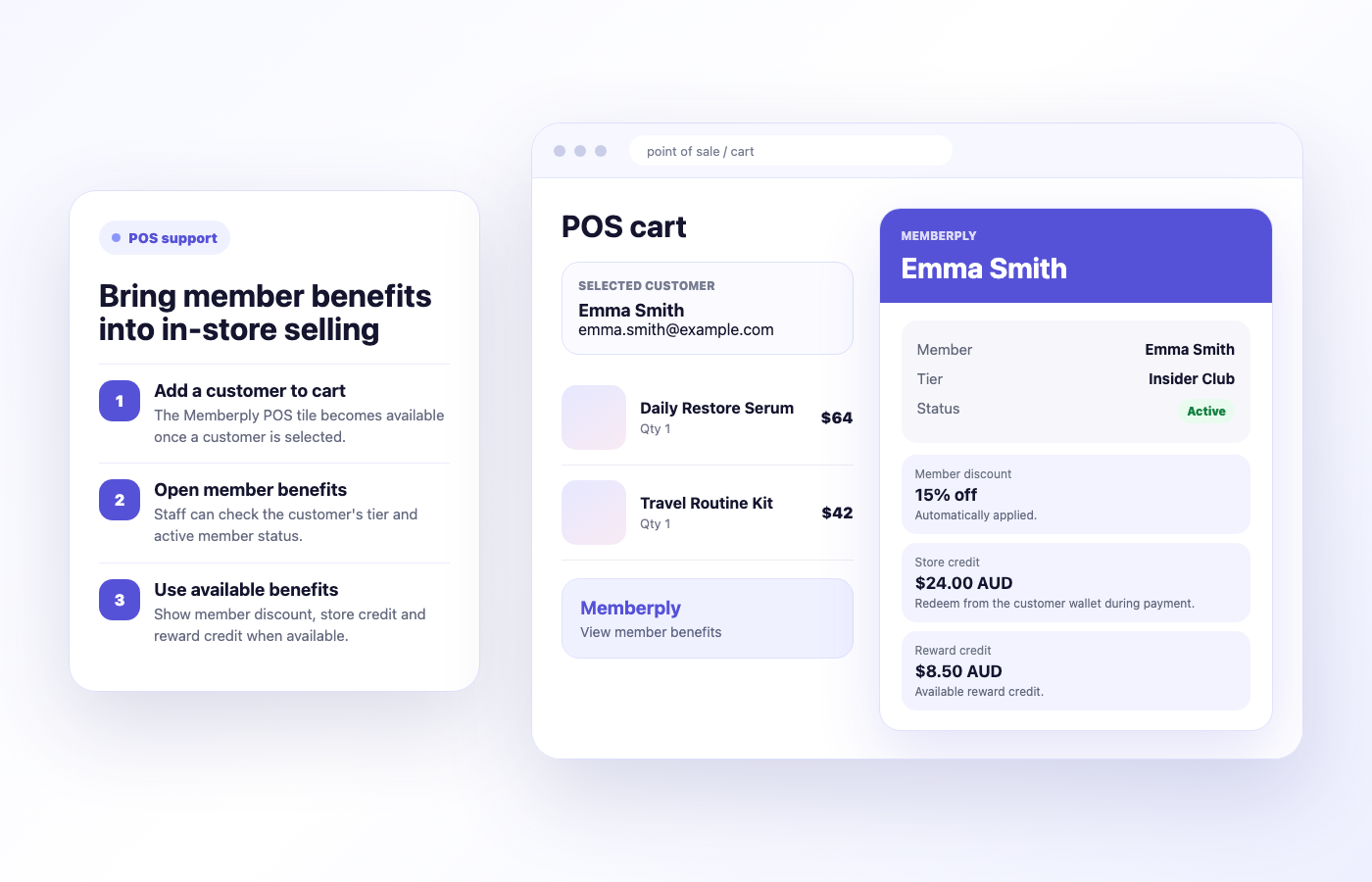
Customer
Selected
Status
Checked
Benefits
Visible
When Memberply fits your Shopify POS workflow
Choose Memberply when you want membership tiers and benefits to connect your online store with physical retail. Staff can recognize a returning member or offer an available membership to a customer who is not already active.
A membership program across channels
A customer joins online and later visits your shop. Staff select that same customer profile, check the membership and review eligible benefits before checkout. The workflow starts with customer identification, so train staff to find the correct profile.
Start with the job you need done
If you only need occasional price adjustments or store credit, Shopify’s built-in tools may be enough. Memberply adds membership tiers, status and benefit rules. Compare membership apps if you are still choosing your program.
How staff serve an existing member
1. Add products and select the customer
Add the customer to the POS cart before opening Memberply. Without a selected customer, the tile asks staff to add one.
2. Open the Memberply tile
Review the customer’s membership tier, status and available benefits. A pending activation is different from an active membership.
3. Check discounts and redeem available credit
Confirm the eligible discount in the cart. For native store credit, use Shopify’s customer wallet or payment flow. The Memberply tile displays the balance; it does not apply native credit directly.
Which membership benefits work in Shopify POS?
Distinguish rewards a member earns from benefits they can use during the current checkout.
| Benefit | In-store workflow | What to check |
|---|---|---|
| Member discounts | Shopify can apply an active member’s eligible discount after the customer is added to the cart. | Verify eligibility and the cart total. Combining automatic discounts requires POS Pro and compatible combination settings. |
| Monthly Free Product | Add the active member and an eligible gift item to the cart, then tap Apply monthly gift in the Memberply tile. | The same single-use code and monthly allowance apply online and in POS. Confirm the eligible item is free before payment. View redemption steps. |
| Native store credit | Staff redeem the customer’s available credit through Shopify POS. | Enable the payment method and staff permission. Credit cannot be redeemed offline or with a gift card product in the cart. |
| Reward points | Eligible POS orders can earn points. Members redeem points in their member area to create store credit. | Points are not a direct POS payment method. Confirm the credit is available before redeeming it at the register. |
| Cashback | Qualifying POS orders earn cashback after order processing. | Cashback is store credit for a later purchase, not a discount applied during the sale that earns it. |
| Other credit benefits | Available native credit from recurring drops, fees or birthday rewards can be spent through the normal credit flow. | Check the actual account balance. A scheduled reward or a displayed reward-credit amount is not a promise of immediately spendable native credit. |
See Shopify’s discount combination rules and POS credit redemption requirements. Learn more about Memberply store credit rewards.
Sell a membership at the register
Select the customer, open Memberply and tap Add beside an available tier when the customer is not already an active member. Continue to Shopify POS checkout. For a recurring tier, Memberply adds the corresponding selling plan.
Check recurring-sale requirements
Shopify currently requires POS 10.13 or later, POS Pro at the location, Shopify Payments and the staff permission Checkout > Ship to customer. Customers need an email and billing address. Use supported card or digital-wallet payments; subscription orders do not support gift cards, split payments or offline checkout.
Review the full Shopify subscription requirements, including supported payment hardware and consent.
Wait for activation after payment
Some payments first reach Authorized status before Shopify marks the order Paid. During that interval, Memberply shows Activation pending and prevents a duplicate membership purchase. Use Refresh status or allow the tile to check again automatically. Do not assume new-member benefits apply to the same checkout that sells the membership.
Set up Memberply in Shopify POS
1. Prepare tiers and benefits
Create your membership tiers and enable the benefits you want to offer. Make membership products available to the Point of Sale sales channel. Follow the recurring-product configuration notes in the setup guide.
2. Add the POS app
In Memberply, open Integrations > Shopify POS. In Shopify admin, open Point of Sale > Settings > POS apps under General, choose Member Benefits and click Add. Confirm the Memberply tile appears with the Benefits & memberships subtitle.
3. Prepare credit redemption
For native credit, enable Store credit in Shopify customer accounts and as a POS payment method. Grant staff the Redeem store credit permission. Staff still use Shopify’s credit payment flow after checking the member.
Follow the complete Memberply Shopify POS setup guide for configuration and troubleshooting.
What does Memberply for Shopify POS cost?
Growth costs US$49/month with unlimited members, standard Memberply features and a 14-day free trial. Memberply takes no percentage of membership revenue. The membership prices your customers pay are set by you.
Shopify subscriptions, POS Pro, payment processing, hardware and the rewards you fund are separate costs. Include POS Pro when you need recurring membership sales or automatic discount combinations. Check Memberply pricing and the current App Store listing.
Test your actual register workflow during the trial
Use one tier and a small set of eligible products. Confirm each step with the staff permissions and POS setup you will use in store.
Recognize the right customer
Check an active member, an inactive member and a customer without a membership. Confirm the tier and benefits match the selected profile.
Check discounts and promotions
Test an eligible and an excluded product, then any promotion you intend to combine. Verify the cart total before payment.
Redeem credit and earn the next reward
Use an available native balance through Shopify’s payment flow. After a qualifying order is processed, check expected points or cashback rather than promising instant redemption during that sale.
Sell and activate a membership
Confirm the tier and recurring terms in checkout. Check the selected customer’s status after payment, including the pending state. Then test the benefits on a subsequent purchase.
Part of the full membership system
POS support works best when the online experience is clear too
In-store support should reinforce the membership program customers already understand online. Use POS support with clear tiers, benefits, a useful member portal and storefront promotion.
Membership tiers
Create the plans staff will see in member summaries.
Member benefits
Configure discounts, credit and rewards that make POS support useful.
Member portal
Give members a self-serve view of their membership value online.
Integrations
Connect memberships with POS, Klaviyo, webhooks and account workflows.
Merchant proof
Merchants use Memberply to launch practical membership programs
These reviews describe Memberply overall, not a test of recurring POS checkout. Check the POS-specific payment requirements above for your store.
"The app is great and does exactly what i need it to. It is well priced and Doug is so great."
Olverum Official Store
United Kingdom
"Works with Shopify's native store credit and checkout. Their pricing is fair, and their support is legendary."
Puzzery
Canada
"Our store is based in Argentina so we don't have access to Shopify Payments... Memberply solved it."
Elemental Outfit
Argentina
Check in members and guests at events
Add Memberply’s separate Event check-in tile to Shopify POS. Select an event, scan a Memberply membership card to review the member’s photo and confirm arrival, or search attendees by name, email or inviting member. Cards identify members with a Going booking; confirmed Plus One guests can be checked in by name. Repeated card scans leave existing check-ins unchanged. Filter by attendee type or check-in status and undo an arrival when needed. No cart customer or purchase is required. Attendance is shared with the merchant dashboard and refreshes every 15 seconds. Internet access and a signed-in Shopify user with Memberply app permissions are required.
Set up attendee search and event check-in. Create events and export the full attendee list from the merchant dashboard.
Shopify POS membership questions
Can I sell memberships through Shopify POS?
Yes. For a selected customer who is not already active, staff can add an available tier from the Memberply tile and proceed to checkout. Recurring tiers use a Shopify selling plan and require Shopify’s supported subscription setup.
Do recurring memberships require Shopify POS Pro?
Yes. Shopify currently requires POS Pro at the selling location, POS 10.13 or later, Shopify Payments and the required staff permissions for subscription sales. Review Shopify’s full requirements before launch.
Can staff apply native store credit from the Memberply tile?
No. The tile displays membership information and available balances. Staff redeem native store credit through Shopify’s customer wallet or payment flow.
Can members spend points directly at the register?
Members redeem points through their member area to create store credit. Staff can then redeem available native credit through Shopify POS; points themselves are not a POS payment method.
Can member discounts combine with Buy X Get Y?
Memberply uses Shopify’s order discount class. Configure the promotion to combine with order discounts and make both discounts combinable. Shopify Plus is not required for this combination, but POS automatic discount combinations require POS Pro.
Why does a new membership show Activation pending?
The payment may be authorized while Shopify is still finalizing the paid order. Memberply prevents a duplicate membership purchase during this interval. Staff can refresh the status or let the tile check again automatically.
Ready to support members in store?
Start your 14-day free trial and test membership sales, eligible discounts and credit redemption with your retail team.
Connect online and in-store memberships
Read our Shopify omnichannel loyalty guide to plan member recognition, discounts, credit redemption and a practical POS launch checklist.
Coordinating membership data with other systems across your stores? Discuss a custom membership rollout. We assess the integration and launch requirements alongside Memberply’s existing Shopify POS features.
Choosing loyalty software for your stores?
Compare Shopify POS loyalty apps by register workflow, reward support, membership fit and total app cost.