Member portal

A Shopify member portal for benefits and rewards

Let members find their membership details, use enabled rewards and manage their plan. Choose the setup that matches your Shopify customer accounts.

US$49/month on Growth. 14-day free trial. View pricing.

Member actionsDesign optionsTrial checklist

Benefits

Show active perks

Credit

Surface rewards

Details

Reduce confusion

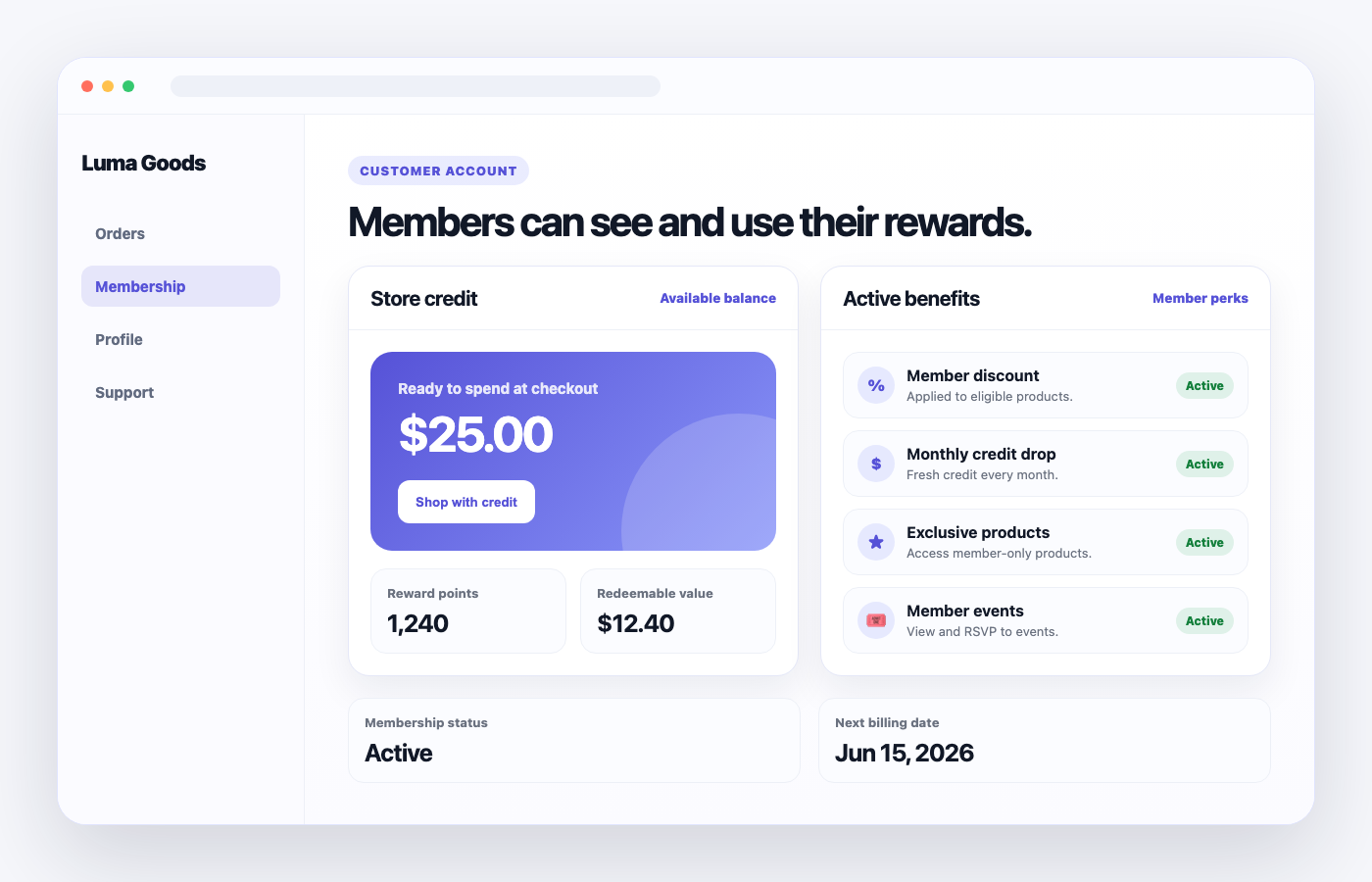
Illustrative member portal with a sample store credit balance, reward points, membership status and enabled benefits

A customer account experience built around membership

Memberply adds a place for members to see their tier, enabled benefits and available rewards. It suits stores where customers join a paid or free membership and need a clear way to use it after signup.

For example, a fictional homewares store could give members one place to check their reward points, find a partner offer and review their next membership payment. The exact cards and actions depend on the benefits you enable and each member’s eligibility.

If you only need order history, profile editing or a general returns workflow, first review Shopify’s account features. Memberply’s focus is membership benefits and management. For a custom account project, use our customer account customization guide.

Member experience

What members can see and do

The portal gives members a central place to understand their membership and use the benefits your store has enabled.

Membership overview

Status, plan and billing details

Show membership status and plan details, with membership cost and the next billing date where applicable. A free or one-time membership does not have the same recurring billing details as a monthly plan.

Rewards

Store credit and reward points

Let members view rewards and redeem available points where enabled. New customer accounts use native Shopify store credit; the legacy redemption flow issues discount codes. Check the account-specific setup below.

Active benefits

Perks they can actually use

Surface enabled benefits such as member discounts, free shipping, signup credit, loyalty drops and birthday credit.

Access

Exclusive products and locked content

Give members a clearer path to member-only products, content and offers without making them hunt around the store.

Community perks

Events and partner offers

Show events, RSVP options and partner offers when those benefits are part of the membership program.

Management

Membership pauses, plan changes and cancellation

When enabled for a tier, eligible monthly members can skip one payment and pause member-only benefits for one billing cycle. Existing Shopify store credit remains available. Members can also change plans or complete the cancellation flow.

Set up the portal for your customer account type

New Shopify customer accounts

  1. Open Shopify Settings > Checkout and edit the active checkout and accounts configuration.
  2. In Apps, find Memberply membership-benefits-page, then add the page to Accounts.
  3. Save, choose Add to menu, and confirm a clear label such as Membership Benefits.
  4. Sign in as a member and test the page from the account menu.

Follow the customer accounts setup guide. The page sits inside Shopify’s account experience.

Existing legacy customer accounts

Legacy stores use a separate Memberply member portal linked from the customer’s Shopify account. Add the Memberply Member Login component to the customer login template and Memberply Access Membership Link to the customer account template, then save and test both entry points.

Use the legacy account setup guide.

Shopify has deprecated legacy accounts and recommends upgrading. Review Shopify’s announcement before planning a new account experience.

Check how rewards reach checkout

For new customer accounts, enable native store credit and test a points redemption followed by a checkout using the resulting credit. In the legacy flow, members receive a discount code and apply it at checkout. A visible points balance is not proof that the entire redemption journey is configured.

See the reward points guide and Shopify store credit feature. Use the correct member identity and test the currencies and benefit rules your store offers.

What can you customize?

New customer accounts

The Memberply page uses Shopify’s supported account components and branding. It is separate from the storefront theme. Do not expect theme CSS, custom fonts or an unrestricted website design to carry over into the account page.

Legacy member portal

Memberply’s legacy Member Portal settings let you upload a logo and change menu background, text and selected colors. Those settings apply to the separate legacy portal, not the new Shopify customer-account page.

Growth includes the standard member experience. A tailored workflow or integration needs a separate feasibility and scope review, and still follows Shopify’s platform limits. Read Memberply’s account styling explanation and Shopify’s extension documentation.

Member portal pricing

Memberply Growth costs US$49/month with unlimited members, all standard features and a 14-day free trial. The standard member portal is included. Memberply does not take a percentage of membership revenue.

Custom enterprise development and ongoing support are scoped separately. Shopify, payment-provider and other applicable charges are separate from the app price. See plan details, the current App Store listing or discuss a custom account project.

Test the member journey during your trial

  1. Find the portal

    Sign in with the correct member email on desktop and mobile. Check the account menu link or legacy portal entry point. Use an active member and a non-member to compare what each can access.

  2. Use an enabled reward

    Check the displayed points and credit, redeem points where enabled, and follow through to checkout. Verify the native credit or discount-code flow for your account type.

  3. Review membership management

    Check available plan changes, cancellation and eligible monthly payment skips. Confirm the displayed effective dates and how benefit access changes. Use controlled test memberships for these actions.

  4. Check benefits and handoff

    Follow links to enabled offers, exclusive content or events. Test expired or paused access, and make sure members know where to get help. Confirm custom requirements before committing to development.

Use the trial to verify functionality and ease of use. It cannot establish long-term retention results. Link the portal in your membership onboarding so members can find and use their benefits after joining.

Merchant proof

Built for stores making membership value visible

The portal works alongside tiers, benefits, store credit and upsells so merchants can sell the membership and keep showing value after signup.

★★★★★

"The app is great and does exactly what i need it to. It is well priced and Doug is so great."

Olverum Official Store

United Kingdom

★★★★★

"Works with Shopify's native store credit and checkout. Their pricing is fair, and their support is legendary."

Puzzery

Canada

★★★★★

"Our store is based in Argentina so we don't have access to Shopify Payments... Memberply solved it."

Elemental Outfit

Argentina

Shopify member portal questions

What can members do in the portal?

Members can view membership details and enabled benefits, use available rewards, and access supported membership-management actions. What appears depends on the tier, account type and member eligibility.

Does Memberply support new and legacy customer accounts?

Yes. New customer accounts use a Memberply page inside Shopify accounts. Existing legacy stores link to a separate Memberply portal. Shopify has deprecated legacy accounts, so review its upgrade guidance before planning a new setup.

Do reward points work the same way in both account types?

Members can redeem eligible points in both experiences. New customer accounts use native Shopify store credit, while the legacy flow issues discount codes for checkout. Configure and test the relevant flow.

Can I style the portal like my storefront?

New customer accounts follow Shopify’s supported components and branding rather than storefront CSS. The separate legacy portal has Memberply settings for its logo and menu colors. Custom work requires a scope review.

Can members manage their membership?

Yes. Members can review billing details, change plans and cancel. Merchants can also let eligible monthly members pause benefits for one billing cycle by skipping a payment.

How does pausing a monthly membership work?

After the merchant enables it for a tier, an eligible member can move the next Shopify billing date forward by one calendar month. Benefits stay available through the paid period, pause during the skipped period, and resume after the next successful payment. Existing Shopify store credit remains spendable.

Is the standard portal included in Growth?

Yes. Growth includes the standard member portal and all standard features for US$49/month, with unlimited members and a 14-day free trial. Custom implementation and ongoing support are quoted separately.

Planning a different member dashboard? Read our Shopify customer account customization guide for supported approaches, design limits and a project checklist.