
Add a VIP membership before Shopify checkout
Give shoppers an optional membership checkout button in your cart drawer or cart page. VIP Checkout+ adds your selected membership to the cart and continues to Shopify checkout.
Memberply Growth: US$49/month, unlimited members and a 14-day app trial.
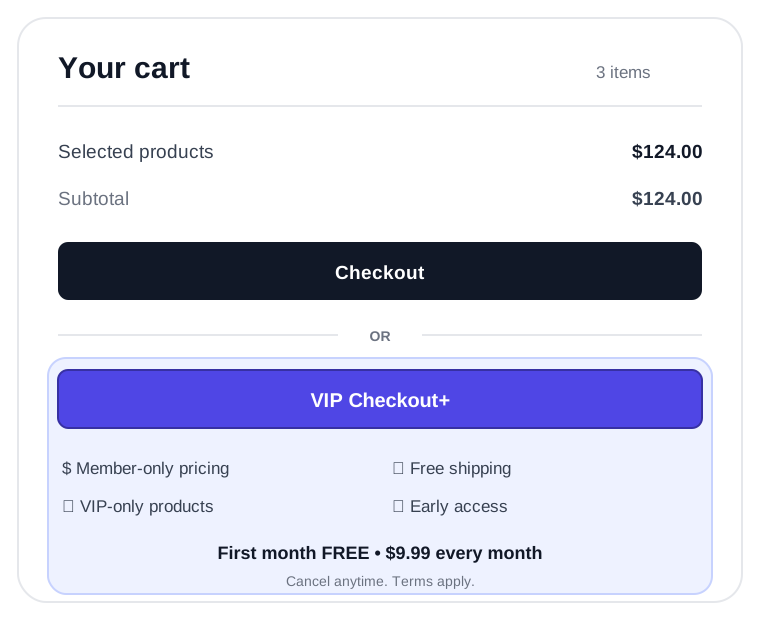
A membership offer beside your cart checkout button
VIP Checkout+ is a storefront membership upsell for Shopify cart drawers and cart pages. It gives shoppers a second checkout action: add your selected membership, keep the existing products in the cart and continue to Shopify checkout to review and pay.
The offer appears before checkout. It does not add an upsell block inside Shopify checkout or complete a purchase without the customer reviewing the order. Use it when the membership benefits are relevant to what shoppers are buying.
Example: show the membership cost alongside its value
On smaller screens, scroll to see every column.
| Item | Illustrative amount |
|---|---|
| Eligible merchandise | A $60 merchandise order before discounts. |
| Member discount | A configured 10% discount saves $6 on eligible merchandise. |
| Membership | A $9.99 monthly membership brings today’s total to $63.99 before taxes or shipping. |
In this sample, $54 of discounted merchandise plus $9.99 membership costs more today than the original $60 cart. Explain the ongoing value and recurring charge clearly. Do not describe the product saving as a lower total checkout cost.
The hero shows a different illustrative first-month-free offer. These are sample merchant membership prices, not Memberply’s app fee or guaranteed savings. Configure any trial and cancellation terms to match the actual membership.
Set up VIP Checkout+ in your Shopify theme
- Choose the membership tier to promote, enable its product and cart upsell setting, then Save and Publish.
- In Memberply, open Grow > Cart Upsell, then select Open Shopify editor for VIP Checkout+. Enable the VIP Checkout+ app embed for the theme you want to use.
- Customize the button, benefit descriptions, icons and footer copy to match your membership.
- Save the theme settings, then test the cart drawer, full cart page and completed checkout with a controlled test customer.
The selected tier also powers the global product and cart upsell offers. Follow the upsell tier setup guide. For the broader choice of placements, see membership upsell options.
Cart drawer, full cart page or custom placement
On smaller screens, scroll to see every column.
| Setup | How it works |
|---|---|
| Automatic placement | Memberply looks for recognized checkout controls in the storefront and places the offer alongside them. |
| With Cart Page Upsell | Automatic placement skips the full-page checkout offer when the cart upsell card is present, while keeping recognized drawer placements. |
| Custom placement | A placement selector replaces automatic placement and targets matching theme elements, with the offer before, after or inside a container. Test for duplicate offers when combining this with the cart upsell card. |
Theme structure matters. A third-party drawer, custom checkout control or theme update can affect detection and layout. Test your exact theme and cart app rather than assuming compatibility with every cart. Custom placement may need help from your theme developer or Memberply support.
Use Cart Page Upsell when you want a larger promotional card on the full cart page. VIP Checkout+ focuses on the alternative checkout action.
Who sees the membership offer?
The offer needs a selected upsell tier and a cart containing a non-membership product. Memberply hides it when it detects an enabled membership product already in the cart, or when the signed-in customer is recognized as an existing member.
Recognition depends on the available customer and cart information. Test a guest, a signed-in non-member, an existing member and a cart with a membership already added. Do not treat a hidden button as a separate membership eligibility or access rule.
Make recurring pricing and trials clear
VIP Checkout+ loads pricing from the selected membership tier and adds the membership with its selling plan when applicable. A tier with both monthly and annual options uses the monthly option in this flow; the button is not a billing-frequency picker.
Customize the button label, colours, border, size and spacing, up to four benefit icons and descriptions, the separator and footer. Keep your benefit and footer copy consistent with the tier settings. Loading tier pricing does not make every custom sentence update automatically.
Check the exact charge due at signup and the next recurring charge in checkout. A joining fee can still be payable during a membership trial. An annual-only trial does not make the monthly option free. Never promise “nothing to pay today” solely because the tier has a trial setting.
See membership tiers for your offer structure and explain the cancellation policy alongside the billing terms.
Which benefits can apply to the joining order?
Eligible member discounts can apply when the membership is in the same cart, subject to the configured benefit, product eligibility and discount rules. Test exclusions and combinations using the exact items and checkout path shoppers will use.
Adding a membership to the cart is not the same as completing membership activation. Do not promise that all store credit, rewards or access benefits are available before purchase completes. Verify the timing of each benefit separately, including any free shipping eligibility.
Use the offer to describe a useful membership, not just a bigger discount. For example, repeat purchasers may value ongoing eligible savings, while occasional buyers need a clear reason to pay a recurring fee.
Memberply pricing and your customer membership are separate
Memberply Growth costs US$49/month, with unlimited members, a 14-day app trial and no Memberply transaction fee. Check the Shopify App Store listing.
You choose the customer membership price and benefits. The merchant app trial does not make a customer’s membership free. Budget discounts, fulfilment, Shopify charges and payment processing when evaluating your offer. Use the paid membership launch guide to plan the full program.
What to test before showing the offer to shoppers
On smaller screens, scroll to see every column.
| Check | What to verify |
|---|---|
| Placement | Drawer and cart page on desktop and mobile, including after quantity changes. |
| Customer state | Guest, signed-in non-member, recognized member and membership already in cart. |
| Checkout and billing | Existing products remain; the correct tier, selling plan, signup charge and recurring terms appear. |
| Benefits and completion | Eligible discounts apply correctly, purchase completes and membership benefits become available at the expected time. |
When evaluating results, compare completed membership purchases and overall checkout completion, together with the cost of the benefits. Button clicks alone do not establish additional revenue or profit.
Shopify VIP checkout questions
Can I add a membership upsell in a Shopify cart drawer?
Yes. VIP Checkout+ can display a membership checkout option beside recognized drawer checkout controls. Test your exact theme and any third-party cart app.
What happens when a shopper clicks VIP Checkout+?
Memberply adds the selected membership product, including its selling plan when applicable, to the existing cart and redirects to Shopify checkout. The customer still reviews and completes the purchase.
Is this an upsell inside Shopify checkout?
No. VIP Checkout+ appears in the storefront cart before Shopify checkout. It sends the shopper to checkout after adding the membership.
Can I combine it with Cart Page Upsell?
Yes. Automatic placement avoids the full-page checkout offer when the cart upsell card is present while retaining recognized drawer placements. Custom selectors need separate duplicate-placement testing.
Can I change the button and benefit text?
Yes. Customize the button appearance, up to four benefit icons and descriptions, the separator and footer. Pricing comes from the selected tier; keep custom text aligned with its terms.
Can shoppers choose monthly or annual membership with this button?
The button uses the selected upsell tier. When that tier offers both monthly and annual billing, this flow uses the monthly option rather than displaying a frequency picker.
Does a free membership trial mean no charge today?
Not necessarily. A joining fee may still apply, and an annual-only trial does not make the monthly option free. Verify the exact checkout charges and subsequent billing terms.
Does joining apply every membership benefit immediately?
No. Eligible same-cart discounts depend on the configured rules. Other benefits can require completed purchase and activation, so test their availability separately.
Merchant proof
Built for merchants creating paid membership revenue
Real reviews point to the same things merchants care about: native store features, practical pricing and support when launching a membership program.
"The app is great and does exactly what i need it to. It is well priced and Doug is so great."
Olverum Official Store
United Kingdom
"Works with Shopify's native store credit and checkout. Their pricing is fair, and their support is legendary."
Puzzery
Canada
"Our store is based in Argentina so we don't have access to Shopify Payments... Memberply solved it."
Elemental Outfit
Argentina
Make membership part of the cart experience
Test VIP Checkout+ with a 14-day app trial.