
Ask members why they are leaving
Add your own reason options to the member cancellation flow. Members can select multiple answers and share an Other response without opening a separate survey.
Memberply Growth: US$49/month, unlimited members and a 14-day app trial.
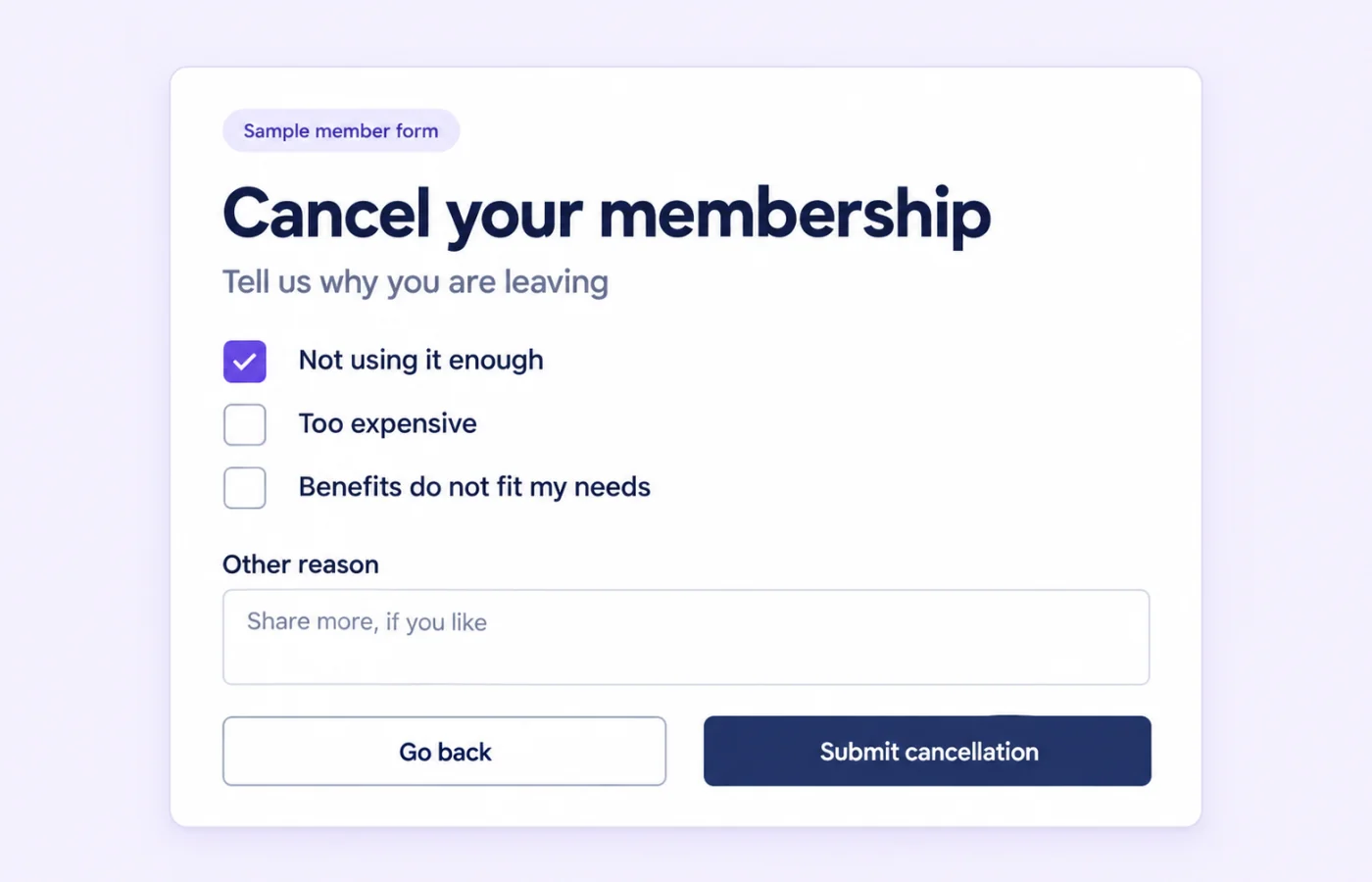
Cancellation feedback inside the membership experience
Memberply lets you configure a store-wide list of cancellation reasons. The member sees these options when using the supported self-service cancellation flow, can select all that apply and can enter additional feedback in an Other field.
This gives customers a way to explain their decision within the member experience. It is a focused feedback feature, not a standalone survey builder or an automated cancellation-discount system.
Create the reasons your members can choose
- Open Settings > Cancellation Reasons in Memberply.
- Select Add Cancellation Reason and enter a clear option.
- Add further reasons as needed, or remove an option with the trash icon.
- Select Save, then review the cancellation flow using a controlled test member.
The list applies at store level. It is not a separate reason list for each membership tier. Keep the options short and distinct so members can recognize their situation without working through overlapping answers.
See the cancellation reasons setup guide for the current settings workflow.
Cancellation reason examples and what to investigate
On smaller screens, scroll to see every column.
| Reason option | Question for your team | Possible improvement to evaluate |
|---|---|---|
| Too expensive | Is the cost unclear, or does the offer feel poor value for this customer? | Review price communication and the value of the included benefits. |
| Not using the membership enough | Does the program fit the customer’s shopping frequency? | Review onboarding and how easy it is to find relevant benefits. |
| Benefits do not fit my needs | Are the included perks useful to the intended audience? | Review the benefit mix and who the membership is marketed to. |
| Had trouble using my benefits | Is there a setup, account or redemption problem? | Investigate the member journey and support issue before changing the offer. |
These are sample options and investigation ideas, not automated Memberply actions or measured retention results. A selected reason is a starting point for understanding the member’s experience. It does not prove the underlying cause or justify sending an automatic discount.
Use clear membership offer copy before signup and useful member communication afterward to help customers understand what they joined.
What members see when cancelling
The supported cancellation interfaces in Shopify customer accounts and the legacy Memberply member area display the configured reasons and an Other field. Members can select multiple options before confirming cancellation.
The feedback choices do not determine when access ends. That follows the membership tier’s cancellation policy. Preview the actual account experience your store uses, including the confirmation and resulting membership status.
Where is cancellation feedback recorded?
For the subscription-contract cancellation flow, Memberply saves the selected reason text and Other response with the subscription cancellation record. The saved answers are separate from the editable list of choices in Settings.
This feature does not currently provide a dedicated merchant-facing cancellation-reason report or export screen. If reviewing individual responses or aggregate trends is essential to your decision, confirm the available retrieval options with Memberply support before relying on that workflow.
Do not assume the same feedback is saved for every membership type or removal action. The no-subscription-contract cancellation path does not save the same subscription-cancellation record. Test the exact membership and cancellation route you intend to use.
Feedback and cancellation timing are separate
On smaller screens, scroll to see every column.
| Situation | What to expect |
|---|---|
| Immediate subscription cancellation | Memberply shows Cancelled after Shopify confirms the cancellation. |
| End-of-billing-period cancellation | The member sees Cancellation scheduled and the access end date, and remains active until the scheduled cancellation completes. |
| Shopify does not confirm scheduled cancellation | Memberply keeps the membership active and retries instead of treating cancellation as completed. |
Collecting a reason is not itself confirmation that billing or access has stopped. Review the resulting status and date. A payment failure is also a different event; see payment retries for that workflow.
What this feature does and does not automate
Memberply provides editable reason choices, multiple selections and an Other response within cancellation. The feature does not automatically generate retention offers, apply discounts based on an answer, or create a win-back campaign.
For planning a separate follow-up, see the membership win-back guide. Check the member’s actual status and sending eligibility first. Do not assume cancellation answers are exported as fields by the Klaviyo or Omnisend integrations.
Use feedback alongside customer conversations and verified usage information. A few responses can suggest questions to investigate, but they do not establish a churn trend or guarantee that a proposed change will improve retention.
Part of your Memberply membership setup
Memberply Growth costs US$49/month, with unlimited members, a 14-day app trial and no Memberply transaction fee. Check the Shopify App Store listing.
A separate survey app is not needed to show these built-in cancellation questions. If you require a broader reporting or follow-up workflow, confirm its scope and any separate tools or costs before committing. Use the paid membership launch guide to plan the full member journey.
What to verify during your app trial
On smaller screens, scroll to see every column.
| Check | What to confirm |
|---|---|
| Reason list | Your saved options appear and are easy to distinguish. |
| Member input | Multiple selections and an Other response work in the account experience you use. |
| Cancellation policy | The resulting status and access end date match the intended policy. |
| Recording and review | Your subscription cancellation route saves feedback, and you have confirmed how you can retrieve it. |
Membership cancellation feedback questions
Can I add my own membership cancellation reasons?
Yes. Open Settings > Cancellation Reasons, add or remove options and save. The configured list applies across the store.
Can members choose more than one reason?
Yes. The supported member cancellation forms allow multiple selections and an additional Other response.
Does this work in both customer account experiences?
The supported cancellation forms in Shopify customer accounts and the legacy Memberply member area display the reason choices and Other field. Test the membership route your store uses.
Where are the answers saved?
In the subscription-contract cancellation flow, selected reason text and the Other response are stored with the subscription cancellation record. The no-contract path does not save that same record.
Is there a cancellation-reason reporting dashboard?
There is currently no dedicated merchant-facing cancellation-reason report or export screen. Confirm retrieval options with Memberply support if reviewing responses is essential.
Does choosing a reason trigger a discount offer?
No. The cancellation reasons feature does not automatically create retention offers, apply discounts or start win-back campaigns.
Does submitting feedback always end access immediately?
No. Access timing follows the membership cancellation policy. An end-of-billing-period cancellation can remain scheduled while the member retains access.
Do cancellation reasons sync to Klaviyo or Omnisend?
Cancellation answers are not included in the documented membership property sets for these integrations. Do not build a campaign assuming those fields are available.
Merchant proof
Built for stores that want membership revenue without heavy setup
Reviews help merchants trust that Memberply can support the practical parts of running and improving a membership program.
"The app is great and does exactly what i need it to. It is well priced and Doug is so great."
Olverum Official Store
United Kingdom
"Works with Shopify's native store credit and checkout. Their pricing is fair, and their support is legendary."
Puzzery
Canada
"Our store is based in Argentina so we don't have access to Shopify Payments... Memberply solved it."
Elemental Outfit
Argentina
Give members a way to share why they leave
Review your cancellation experience with a 14-day app trial.