
Let shoppers add membership from the cart
Show a membership offer while shoppers review their order. The Cart Page Upsell card adds your selected tier, reloads the cart and lets customers review eligible savings before checkout.
Memberply Growth: US$49/month, unlimited members and a 14-day app trial.
A membership offer on the full Shopify cart page
Cart Page Upsell is a promotional app block for your full cart page. It gives shoppers space to read the membership offer and add the selected tier while reviewing their existing products.
Use it when you want a membership card within the cart template. For an alternative checkout button that also covers cart drawers, see VIP Checkout+. The membership upsell overview compares all storefront placements.
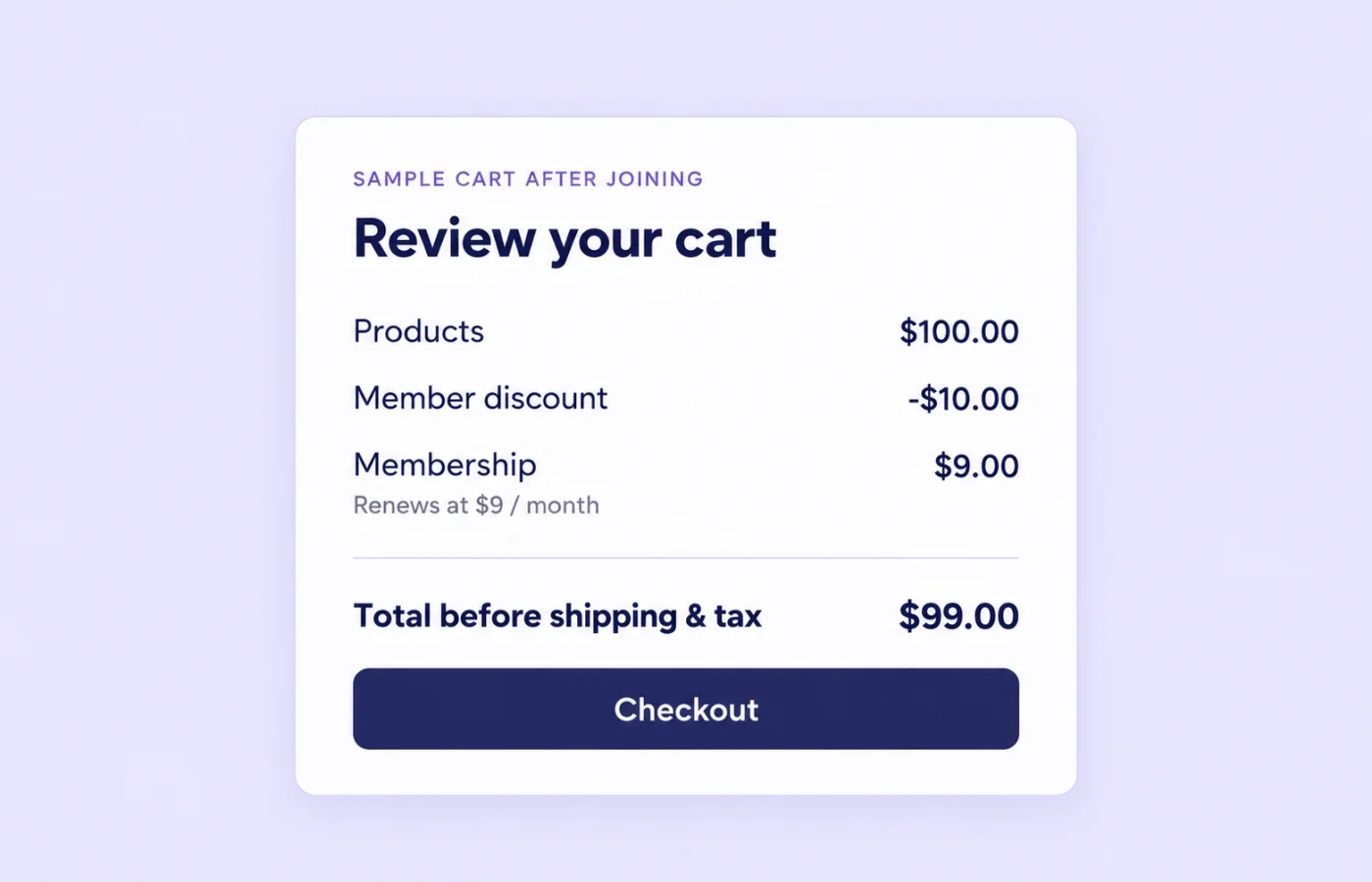
Example: calculate the total after adding membership
On smaller screens, scroll to see every column.
| Line | Amount | Meaning |
|---|---|---|
| Products | $100.00 | Eligible merchandise before the member discount. |
| Member discount | -$10.00 | An illustrative 10% discount on those products. |
| Membership | $9.00 | A sample membership charged today and renewed at $9 per month. |
| Total before shipping and tax | $99.00 | $100 minus $10 plus $9. The combined saving today is $1. |
These are sample customer prices, not Memberply’s app fee or guaranteed results. A $10 product discount does not mean the customer’s total falls by $10 once a membership fee is included. With a smaller basket, the fee could exceed the product saving.
Keep the offer useful to the customer’s shopping pattern. A repeat buyer may value ongoing eligible savings, while a one-off shopper may prefer to continue without joining.
What happens when Join Now is clicked?
Memberply adds the selected membership product with its selling plan when applicable, then reloads the cart page. Existing products remain in the cart. The shopper can review the updated order and use the normal checkout button when ready.
This action does not complete payment or send the shopper straight to checkout. Eligible member discounts can apply through Shopify’s cart and checkout calculations, subject to the configured rules. Membership activation and other benefits may require completed purchase.
Add the Cart Page Upsell block to your theme
- Create and enable the membership tier you want to promote. Select its product and cart upsell setting, then Save and Publish.
- Configure the member benefits, including an eligible member discount if savings are part of the offer.
- In the Shopify theme editor, open the cart template. Near checkout, choose Add section > Apps > Cart Page Upsell.
- Move the card into position and edit its heading, benefit lines, icons, button label and colours.
- Save, then test the full cart page in the theme shoppers will use.
The selected tier is shared with the global product upsell and VIP Checkout+. Follow the upsell tier selection guide and cart upsell setup guide.
When the offer is hidden or unavailable
On smaller screens, scroll to see every column.
| Situation | Expected behavior |
|---|---|
| No regular product in cart | The join action is unavailable until there is a non-membership product to use for pricing. |
| Membership already detected in cart | The join button is disabled and shows an already-in-cart message. |
| Recognized customer owns the selected tier | The card is hidden, preventing an offer to buy that same tier again. |
| Recognized member already has a lower price | The card is hidden when the pricing response shows their membership discount on the reference product. |
| No upsell tier or pricing unavailable | The offer can stay hidden. Temporary pricing service failures receive one automatic retry. |
The block uses a regular cart item as the reference for its pricing request. Its presence is not proof that every product in a mixed cart qualifies for the same discount. Test eligible and excluded products together, and recheck after changing quantities or removing items.
Customer recognition depends on sign-in and available membership information. Test a guest, a signed-in non-member and an existing member rather than assuming all customers see the same offer.
Make signup charges and recurring billing clear
The card can display billing-frequency and first-charge messaging from the selected tier. When a tier offers both monthly and annual billing, this flow uses the monthly selling plan first; it does not provide a frequency picker.
Custom headings and benefit lines are merchant-written copy. Keep them aligned with the tier’s price, trial conditions, joining fee and cancellation policy. A trial does not necessarily mean no charge today, and an annual-only trial does not make the monthly option free.
Verify the actual membership amount due today and the renewal terms in checkout. Do not rely on a short billing label as the complete offer. See membership tiers for the underlying settings.
Check discount and shipping conditions
Configured member discounts can apply to eligible products when the membership is in the same cart. Product and collection exclusions, minimum requirements and discount-combination rules still matter.
If free shipping is included, its conditions are evaluated when Shopify calculates shipping rates, normally at checkout. A cart card alone cannot establish the final shipping cost.
Do not promise all credit, reward or access benefits simply because the membership was added to cart. Verify each benefit’s activation or issuance timing after the purchase.
Combine the cart card with VIP Checkout+
Cart Page Upsell is for the full cart page, not the drawer. You can enable VIP Checkout+ to cover recognized cart-drawer checkout controls as well.
With automatic placement, VIP Checkout+ skips the full-page checkout offer when the cart upsell card is present. A custom VIP placement selector overrides that duplicate-placement check, so test your selector if you use both tools.
Check desktop and mobile, drawer reopening, cart changes and the regular checkout path. Theme structure and third-party cart apps can affect placement; confirm your exact setup rather than assuming universal compatibility.
Your customer offer and Memberply’s app price
Memberply Growth costs US$49/month, with unlimited members, a 14-day app trial and no Memberply transaction fee. Check the Shopify App Store listing.
The example’s $9 customer membership is your own offer, separate from this app subscription. Budget product costs, discounts, fulfilment, Shopify charges and payment processing. Use the paid membership launch guide to plan the complete program.
What to test before publishing the cart offer
On smaller screens, scroll to see every column.
| Check | What to confirm |
|---|---|
| Cart changes | Join, reload, quantity changes and membership removal leave the expected items and totals. |
| Customer states | Guests, members and carts already containing membership receive the intended visibility and button state. |
| Billing and savings | The signup charge, selling plan, eligible discounts and renewal terms match your offer. |
| Theme coverage | Full cart page, drawer combination and mobile controls work without duplicate offers. |
Measure completed membership purchases alongside overall checkout completion and benefit costs. If shoppers leave, keep any cart recovery messaging consistent with the same pricing and eligibility terms.
Cart page membership upsell questions
Can shoppers add membership from the Shopify cart page?
Yes. Cart Page Upsell adds the selected membership tier to the existing cart and reloads the page so shoppers can review the order before checkout.
Does Join Now take the shopper straight to checkout?
No. This cart block reloads the cart after adding membership. VIP Checkout+ is the separate option that adds membership and continues directly to checkout.
Does the cart card also appear in a cart drawer?
No. Use VIP Checkout+ for drawer placement. You can combine it with the full-page cart card and test the resulting layout.
Will the same membership be added twice?
The block disables its join action when it detects a membership already in the cart. It also hides the offer for a recognized customer who already owns the selected tier. Test these states in your store.
Does joining discount every item in the cart?
No. Discounts depend on benefit rules, product and collection exclusions, minimum requirements and combinations. A visible offer does not mean every line in a mixed cart qualifies.
Can customers choose monthly or annual billing in the card?
The card uses the selected upsell tier and prefers its monthly selling plan when both are available. It does not display a billing-frequency picker.
Can I promise no charge today during a trial?
Only if the actual checkout terms support that promise. Joining fees can still be due, and an annual-only trial does not make the monthly option free.
Can I customize the cart membership offer?
Yes. Edit the heading, benefit lines, icons, button label, font size and colours in the theme block. Keep custom copy consistent with membership pricing and benefit conditions.
Merchant proof
Merchants use Memberply to launch practical membership programs
Real reviews point to the same conversion concerns: clear value, native store features, sensible pricing and responsive support.
"The app is great and does exactly what i need it to. It is well priced and Doug is so great."
Olverum Official Store
United Kingdom
"Works with Shopify's native store credit and checkout. Their pricing is fair, and their support is legendary."
Puzzery
Canada
"Our store is based in Argentina so we don't have access to Shopify Payments... Memberply solved it."
Elemental Outfit
Argentina
Show membership value while shoppers review their cart
Test your cart membership offer with a 14-day app trial.