
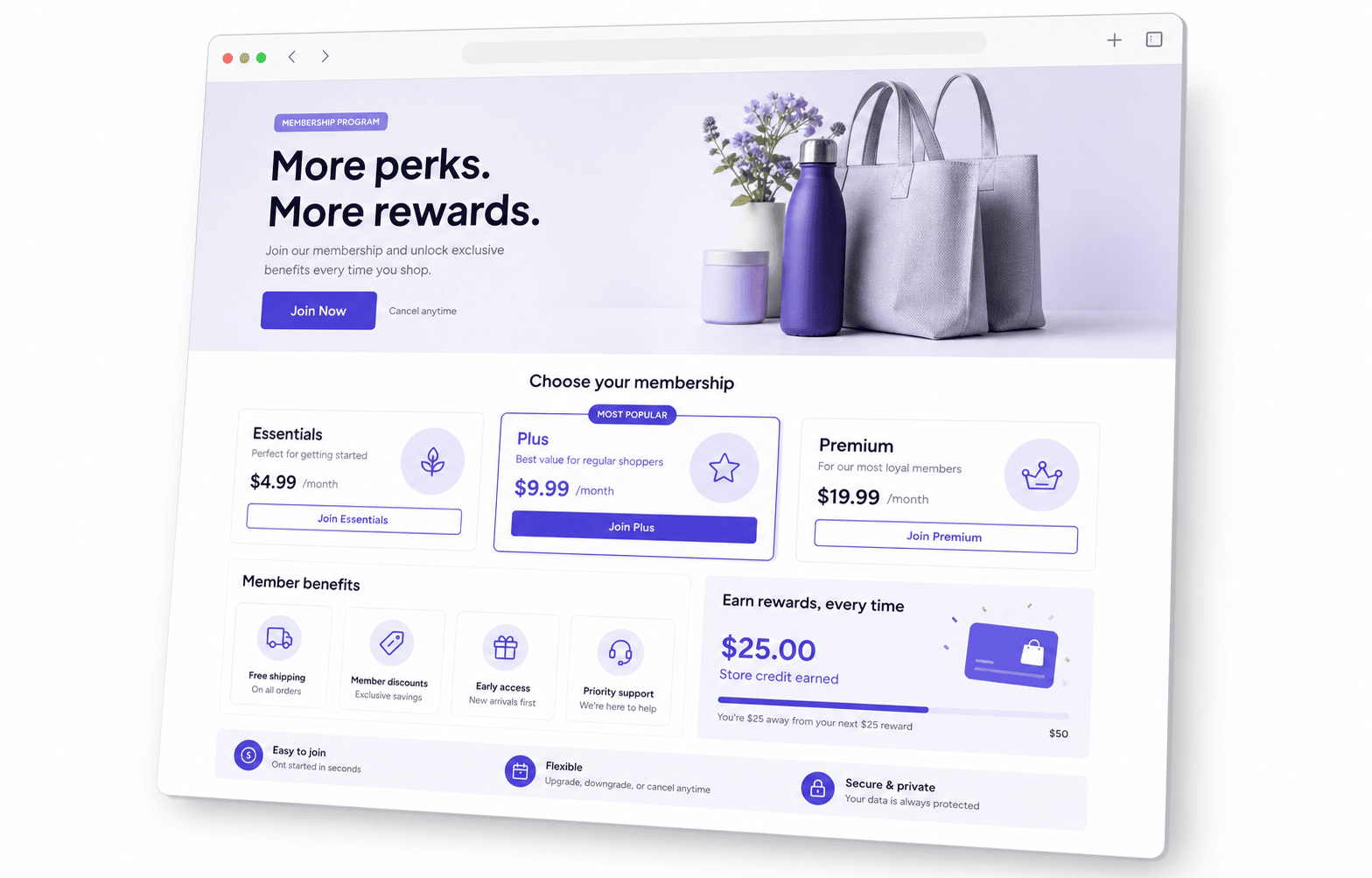
Membership landing page examples

6 membership landing page examples for Shopify stores

Explore six illustrative membership landing pages with sample headlines, benefits and joining prompts. Use the page structure and tier comparison to explain your own Shopify offer clearly.

Offer
why join
Tiers
what members get
CTA
join now
Shopify membership landing page example showing tiers, benefits and reasons to join

Quick answer

A good membership landing page makes the value obvious

A membership landing page gives customers one place to understand what the membership is, what it costs, what they get, and why joining is worth it.

For Shopify merchants, Memberply helps create membership landing pages that explain tiers, store credit, discounts, free shipping, member-only access, FAQs and joining calls to action.

Best fit for Memberply

Use Memberply when your membership needs a focused explanation page, clear tier cards, benefit sections, join buttons and links from product pages, cart pages and storefront widgets.

6 membership landing page examples to adapt

Choose the example that matches the main reason customers would join. These are original, illustrative copy and layout ideas, not real merchant pages, measured conversion winners or preconfigured Memberply offers. Replace every price, threshold and promise with your actual terms before publishing.

1. Paid VIP club landing page

Best fit: Fashion and lifestyle stores offering access alongside shopping benefits.

Illustrative page copy

Your next favorite drop, a little earlier.

Join the VIP club for early access to selected launches and member-only offers. See the plan below for the membership price and billing schedule.

Button wording: Explore VIP membership

What to show below the headline: A launch calendar or an accurate preview of member access makes the benefit tangible. Explain the access window, eligible launches and whether stock is limited. Early access does not guarantee availability.

2. Store credit membership landing page

Best fit: Stores where members return regularly and can use the credit.

Illustrative page copy

Build your next order with member credit.

Receive $20 in store credit each month with a $20 monthly membership. Apply available credit to eligible future purchases.

Button wording: View the credit membership

What to show below the headline: This illustrative $20-for-$20 offer shifts purchase timing; it is not $20 of free savings. State when credit is granted, where it can be redeemed, any expiry and what happens to unused credit after cancellation. Adapt the numbers to your actual offer.

3. Free shipping membership landing page

Best fit: Stores with repeat orders and shipping costs customers can predict.

Illustrative page copy

Make regular restocks easier.

Members receive free standard shipping on eligible domestic orders over $40 while their membership is active.

Button wording: See shipping membership details

What to show below the headline: Place eligible destinations, the order minimum and shipping method beside the benefit. List exclusions such as oversized goods if they apply. Do not advertise free shipping on every order when conditions exist.

4. Member discount club landing page

Best fit: Stores with sufficient margin on eligible repeat purchases.

Illustrative page copy

Member pricing on the essentials you reorder.

Join for 10% off selected full-price products. See eligible products and the membership fee before joining.

Button wording: Compare member pricing

What to show below the headline: Show an illustrative eligible $100 basket becoming $90 before shipping, tax and membership fees. Identify excluded products and whether discounts combine with other offers. Actual net savings depend on eligible spending and the fee.

5. Exclusive access membership landing page

Best fit: Brands with a real product collection, content library or event benefit to restrict.

Illustrative page copy

A collection reserved for members.

Explore selected member-only products and content through your customer account while your membership is active.

Button wording: Explore member access

What to show below the headline: Show a permitted preview and explain what is included today. Buying access does not mean every product is free, future releases are guaranteed or events have unlimited capacity. State any separate charges.

6. Paid loyalty membership landing page

Best fit: Stores offering a clearly defined paid reward benefit for repeat shoppers.

Illustrative page copy

Earn store credit on eligible orders.

Members earn 5% back as store credit on eligible purchases, ready to put toward a future order.

Button wording: View reward membership

What to show below the headline: In an illustrative percentage-only offer, an eligible $80 purchase earns $4 in credit. State the membership fee, earning basis, minimum spend, cap, credit timing and expiry where applicable. Distinguish credit from cash and a paid membership from a free, spend-earned loyalty tier.

For deeper offer planning, see the store credit guide, member discount guide and cashback reward explanation.

What should a membership landing page include?

A membership landing page explains the offer and helps a visitor decide whether to join. It is different from the signed-in member dashboard where existing members use benefits. Use this adaptable order for a Shopify membership page:

  1. 1. Headline and short answer

    Name the audience and main benefit. Explain that this is a membership and whether it is paid. A visitor should not need to infer the offer from a club name.

  2. 2. Pricing and joining action

    Show the amount due, currency, billing interval and renewal terms next to the joining button. If annual billing is displayed as a monthly equivalent, show the actual annual charge clearly.

  3. 3. Benefit explanation

    Give each important benefit an example and its relevant conditions. Separate included access from products or services members still pay for.

  4. 4. Tier comparison

    Compare the same benefits in the same order. Explain what changes between levels rather than relying on names such as Gold and Platinum.

  5. 5. Evidence

    Use authentic merchant or member feedback with permission and accurate context. If the program is new, show a truthful preview of the experience instead of inventing testimonials or member counts.

  6. 6. How joining and membership management work

    Explain the next step, where benefits appear, how renewal works and how cancellation affects access. Match this copy to your configured membership rules.

  7. 7. FAQs and final action

    Answer remaining questions about eligibility, redemption and billing, then repeat the same joining action. Keep important conditions visible alongside the offer too.

Show what changes between membership tiers

Use a side-by-side comparison when you have meaningfully different offers. This illustrative two-tier example uses USD and monthly billing. It is a copy-planning example, not a recommended price or an existing Memberply plan.

On small screens, scroll the table horizontally.

Example monthly membership benefits and joining actions
DetailMemberMember Plus
Membership fee$8 USD per month$15 USD per month
Member discount10% off selected full-price items10% off selected full-price items
Standard shippingRegular shipping charges applyFree on eligible domestic orders over $40
Early accessNot includedSelected launches, subject to availability
Button wordingJoin Member for $8/monthJoin Member Plus for $15/month

Before the buttons, state whether the plans renew automatically and link to accurate cancellation terms. Do not label a tier “Most popular” unless you have evidence. For this example, a shopper spending $100 on eligible items receives a $10 discount; after an $8 monthly fee, that is $2 in net discount savings before other costs. A lower-spend shopper may not recover the fee.

Use the membership tier name generator for naming ideas and the membership pricing calculator to explore the economics of your proposed offer.

Match the call to action to the joining flow

Use a button that describes the real next step. “Join Member for $8/month” fits an immediately available paid membership. “Apply for membership” fits an application process. “Join the waitlist” fits an offer that is not open yet. A button that only adds a membership to the cart should not imply that enrollment is already complete.

Keep example buttons in a design mockup separate from live joining actions. Test every live button against the intended tier and monthly or yearly purchase option. Product-page and cart prompts can link to the landing page when a shopper needs more detail, or use an appropriate joining action once the offer and price are clear.

For store placement ideas, review product page upsells and cart page upsells.

Build and check your Shopify membership landing page

In Memberply, create and enable at least one membership tier, then open Landing Page. Edit the starter design in the visual editor, select Save and Publish, and use View Page to review the live result. Add the published page to your store navigation when it is ready.

If you already have a page, use Integrations → Custom storefront → Connect an existing button. Choose the membership tier and purchase option, then follow the generated code instructions. The connected button adds that membership to the cart and takes the shopper to their cart.

Follow the landing page setup documentation and existing-button instructions for configuration details.

  • Check the mobile page

    Read the headline, full price and benefit conditions on a narrow screen. Check text size, table scrolling and button spacing.

  • Check the purchase path

    Verify the intended tier, price and billing option in the cart. Confirm the page makes renewal and cancellation terms easy to find.

  • Check benefit accuracy

    Compare every promise with the enabled benefits and eligibility rules. Review the member experience in Shopify customer accounts.

  • Measure the page

    Track visits, joining-button clicks and completed membership purchases separately where your analytics supports it. Compare equivalent periods and traffic sources before attributing a change to the page.

Membership landing page questions

What should a membership landing page include?

Include a clear reason to join, pricing and billing terms, benefit examples, tier differences, authentic evidence, joining and cancellation information, FAQs and a clear joining action.

What are useful membership landing page examples?

Paid VIP clubs, store credit memberships, free shipping memberships, member discount clubs, exclusive access programs and paid loyalty memberships each need a page that explains their main benefit and conditions.

Are the examples on this page real merchant results?

No. They are illustrative copy and layout ideas. The prices, benefits and calculations are examples, not measured conversion results or preconfigured offers. Adapt them to your actual membership.

How is a membership landing page different from a subscription landing page?

A membership page sells access or ongoing member benefits. A product subscription page explains recurring deliveries, quantities and delivery frequency. If an offer includes both, explain each component and its billing terms separately.

Should membership pricing appear on the landing page?

For an offer with a fixed price, show the fee, currency, billing interval and relevant renewal terms near the joining action. Explain what is included and any conditions before the customer commits.

Can I use an existing Shopify page with Memberply?

Yes. Memberply can connect an existing button to a selected membership tier and purchase option through Integrations, Custom storefront, Connect an existing button. The connected button adds the membership to the cart and takes the shopper to their cart.

What should a membership joining button say?

Use wording that matches the next step, such as Join Member for $8/month for a paid offer, Apply for membership for an application, or Join the waitlist for a future offer. The destination and purchase terms must match the label.

Ready to launch a membership landing page?

Use Memberply to explain tiers, benefits, pricing and reasons to join with a focused membership page.