
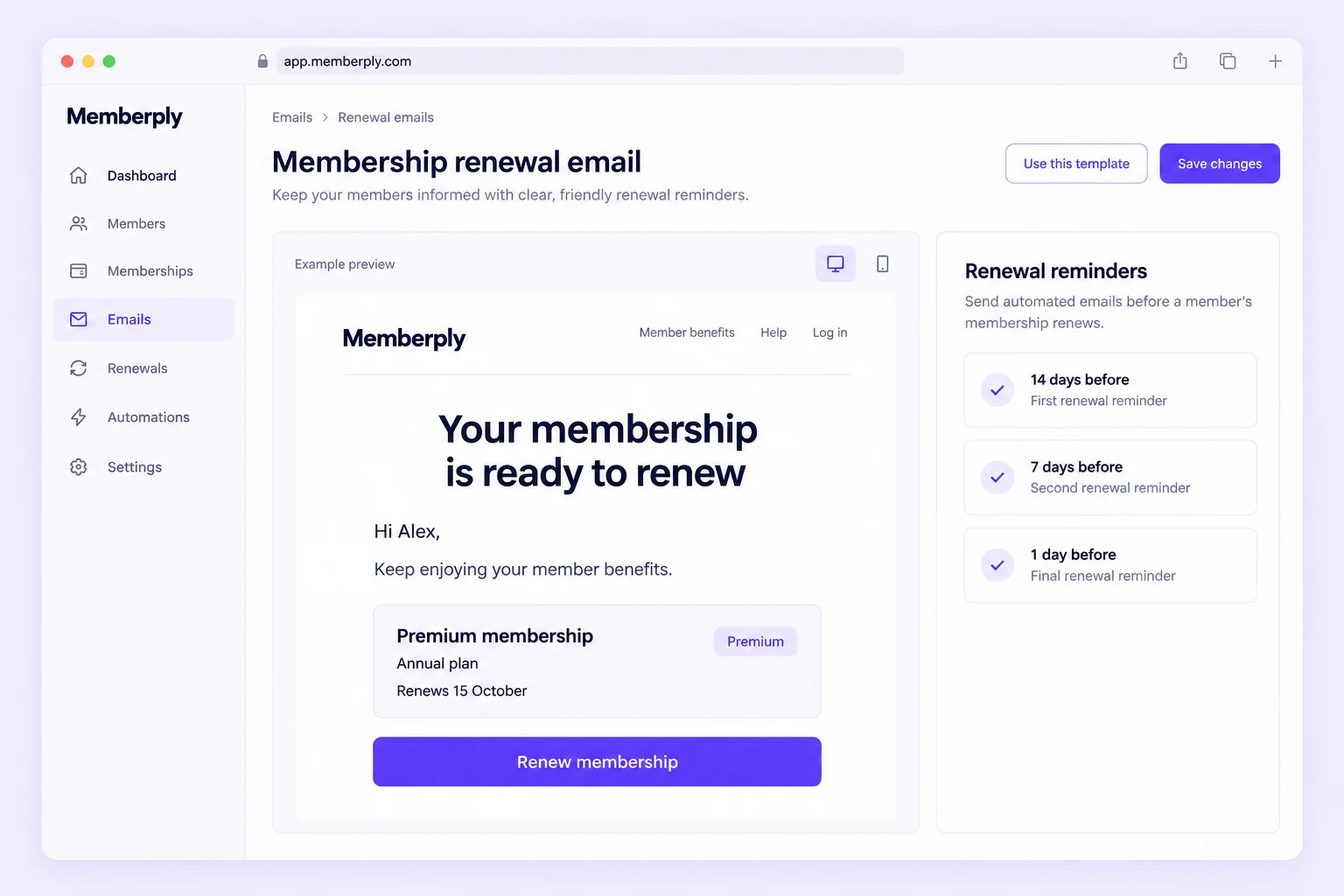
What should a membership renewal email say?
A membership renewal email should explain the benefit of continuing, the verified renewal or expiry date, the amount and currency where payment is involved, and the action the member needs to take. First establish whether the membership renews automatically or requires a new purchase. Those messages should not use the same call to action.
For automatic renewal, explain the upcoming charge and link to membership management. For manual renewal, make the next purchase clear. A failed-payment message should help the member review their payment method; a confirmation should only follow a completed renewal.
The six examples below are original illustrative website examples, not messages sent to members or campaigns automatically configured by Memberply. Bracketed fields are writing placeholders, not guaranteed editor variables. Replace them with verified values and real links. Use “Hi there” if no first name is available, and offer replies only when the sender inbox is monitored.
Six membership renewal email examples
1. Automatic-renewal notice
Audience and timing: An active recurring membership with a verified next charge date, amount and management link. Send before the charge according to your agreed notice schedule.
Stop rule: Do not send after cancellation, a changed renewal date or a successful renewal. This is not a request to buy a second membership.
Subject: Your [Membership name] continues on [Renewal date]
Hi [First name],
Your [Membership name] keeps [specific ongoing benefit] available for your next visit.
Your membership is scheduled to renew automatically on [Renewal date] at [Amount and currency] for [Billing period], using your saved payment method. No action is needed if you’d like to continue.
You can review your plan, payment details and cancellation options in your account.
[Manage membership]
If you need a hand, just reply to this email. We’re happy to help!
2. Manual-renewal reminder
Audience and timing: An active one-time paid membership approaching its verified access end date. An early reminder can give the member time to decide.
Stop rule: Suppress when renewal is completed or access is extended. Do not describe this tier as automatically renewing.
Subject: Keep enjoying [Benefit] with [Membership name]
Hi [First name],
We’d love to keep [specific benefit] available for you through [Membership name].
Your current membership ends on [Expiry date]. It does not renew automatically. You can continue for [New term] at [Amount and currency].
[Renew membership]
The checkout page shows the full renewal terms before you pay.
If you need a hand, just reply to this email. We’re happy to help!
3. Final manual-renewal reminder
Audience and timing: A one-time paid membership still due to expire, with no completed renewal or extension. Use the actual final reminder interval configured for that tier.
Stop rule: Do not invent a deadline or claim all existing credit disappears. Confirm access and reward treatment separately.
Subject: Your [Membership name] ends on [Expiry date]
Hi [First name],
You can keep enjoying [specific ongoing benefit] by continuing your [Membership name].
Your current membership ends on [Expiry date]. To continue for [New term], renew at [Amount and currency].
[Renew membership]
If you choose not to renew, your membership access ends on that date. You can review what happens to previously issued rewards in [linked membership terms].
If you have any questions, just reply. We’re happy to help!
4. Failed renewal payment
Audience and timing: A confirmed failed renewal charge that remains unresolved. Send after the actual failure event; include retry or access dates only if verified.
Stop rule: Stop when payment succeeds, the subscription ends or support resolves the issue. Do not ask the member to create a duplicate subscription.
Subject: A quick update about your [Membership name] renewal
Hi [First name],
We’d like to help you keep enjoying [specific benefit] with [Membership name].
We couldn’t complete your renewal payment of [Amount and currency] on [Attempt date]. Please review your saved payment method using the secure account page.
[Review payment method]
Your current membership access is [verified access status]. [Insert the confirmed next retry date or required action, if applicable.]
If you need a hand, just reply to this email. We’re happy to help!
5. Successful renewal confirmation
Audience and timing: A completed renewal confirmed by the payment and membership records, with verified dates and tier.
Stop rule: Do not send on checkout start, pending payment or a scheduled retry. Remove queued reminders for the completed renewal.
Subject: You’re all set for your next [Membership term]
Hi [First name],
Thanks for continuing your [Membership name]. You can keep enjoying [specific ongoing benefit].
Your renewal is confirmed for [Amount and currency]. Your membership is active for [Confirmed term dates].
[View member benefits]
You’ll find your current benefits and membership details in your account.
If you need a hand, just reply to this email. We’re happy to help!
6. Invitation after a manual membership ends
Audience and timing: A confirmed ended one-time membership, where a rejoin invitation is appropriate for the customer’s communication preferences.
Stop rule: Exclude active members, unresolved payments, complaints and customers who should not receive promotional follow-up. Ended status is different from a scheduled cancellation.
Subject: You’re welcome back to [Membership name]
Hi [First name],
If [specific benefit] would be useful again, you’re welcome to rejoin [Membership name].
Your previous membership ended on [Expiry date]. The current option is [Membership term] at [Amount and currency].
[View membership options]
You can review the current benefits and terms before deciding.
If you have any questions, just reply. We’re happy to help!
Choose timing and stop rules for each renewal path
On small screens, scroll the table horizontally.
| Situation | When to consider sending | Required check | Stop or change the message when |
|---|---|---|---|
| Automatic renewal | Before the scheduled charge, using the notice timing applicable to the plan. | Verified next billing date, amount, currency, term and account link. | The member cancels, changes plan, changes the date or renews. |
| One-time paid membership | Before access expires; Memberply offers optional 14-, 7- and 1-day reminders. | Active membership, actual expiry, correct renewal checkout and any configured incentive. | Renewal completes or the expiry changes; recheck state before sending. |
| Failed charge | After a verified failure, then only as the recovery process requires. | Unresolved payment status, secure update path and actual retry/access rules. | Payment succeeds, cancellation completes or support resolves the issue. |
| Renewal confirmation | After successful payment and the membership record is updated. | Correct tier, term and charge. | The event is pending, duplicated, reversed or does not represent a renewal. |
| Ended membership | After confirmed access end, where a rejoin invitation is appropriate. | Current eligibility, preferences and absence of a conflicting support issue. | The customer rejoins or should be excluded from promotional follow-up. |
The 14-, 7- and 1-day intervals describe Memberply’s optional one-time paid-tier reminder schedule. They are not a universal schedule for recurring charges. Free and gift tiers have a separate expiry-reminder flow; they should not receive a paid-renewal demand.
Choose enough communication to make the next step clear. Do not send every example to every member. A price change, special promotion or change of billing terms needs its own accurate wording and review rather than being hidden in a generic reminder.
Explain real member value without inventing savings
Choose one relevant ongoing benefit, such as an eligible shipping benefit or member discount, and state its conditions plainly. A benefit can be valuable without claiming that every member saved a particular amount.
Only personalize earned credit, reward balances, usage or savings when you have a verified source and a consistent calculation. Do not turn an issued reward into a claim that it was used. Do not claim an existing balance expires when membership ends unless that is the actual rule for that reward.
Use your membership benefit definitions and loyalty measurement records to choose honest examples. A beauty store might remind a member about an eligible member discount; a coffee store might highlight a shipping benefit relevant to their next purchase. These are illustrative choices, not customer results.
Set up the right renewal workflow in Memberply
One-time paid renewal reminders
Open Store setup > Emails, select the one-time paid tier and choose Edit Emails. Edit and preview the available reminders and enable only those you need. Each reminder has its own toggle. Memberply supplies the renewal checkout route and any configured early-renewal incentive for that paid one-time tier.
Free or gift expiry reminders
Use the separate free-tier expiry workflow. Its button should lead to the next membership options you choose; it does not automatically become a paid renewal checkout. Use wording that matches the member’s current free access.
Recurring payment recovery
Review Settings > Retry Failed Payments for the retry interval and maximum attempts. Confirm the actual payment and access state before promising another attempt or an access deadline.
Other event-driven messages
Before using an automatic-charge notice, failure message or confirmation example, confirm the actual sending system and event data available. The examples do not establish that each message has a configurable native Memberply template.
Follow the current member email editor guide, one-time renewal reminder instructions and failed-payment retry settings. Use the on-screen preview before enabling a message.
Memberply’s Klaviyo integration supplies documented membership profile properties. An expiry or status field does not automatically establish a next billing date, charge amount, payment-failure event or reward balance. Verify each required field and trigger before building a flow. Assign one sending system to each message to prevent duplicates.
Shopify also notes that available subscription settings depend on the installed app. Check Shopify’s subscription-management guidance alongside your actual app configuration.
Check every message before enabling it
On small screens, scroll the table horizontally.
| Check | What good looks like |
|---|---|
| Correct audience | Recurring, one-time, free, pending-payment and ended memberships are separated. |
| Current state | A fresh membership/payment check prevents stale reminders after renewal or cancellation. |
| Clear terms | Date, amount, currency, billing period and required action match the real offer. |
| Working destination | The button opens the intended secure account or checkout route on mobile. |
| Accurate benefits | Any benefit, balance, expiry or savings statement is supported by current data. |
| Readable message | Short paragraphs, visible spacing, one primary action and an accurate plain-text version in the sending platform. |
| Recovery and support | Replies reach a monitored inbox, and no message requests card details by email. |
| Duplicate prevention | Native reminders, Shopify notifications and external flows have clear ownership and exclusions. |
These website examples are written with explicit paragraphs and spacing. When adapting them into an email tool, verify its saved HTML and plain-text version. Preview the actual personalized result, including the no-name fallback and an absent optional value. Never send visible placeholder text to a member.
Measure renewal outcomes, not just email opens
Track completed renewals among memberships due in the same period, using a stated cutoff and grace-period rule. Separate failed-payment recovery from voluntary renewal decisions. An email open does not prove the member renewed, and a renewal does not prove the email caused it.
For a fictional example, if 45 of 50 memberships due in a period renew by the agreed cutoff, renewal rate is 90%. Record late recoveries separately or apply the same cutoff consistently in each comparison. Use the monthly KPI worksheet for definitions and next actions.
Review support questions and cancellation feedback alongside the numbers. If members do not understand renewal terms, clarify the offer. If they cannot find their benefits, improve onboarding. If payment failures dominate, investigate the recovery flow. For broader planning, see the membership retention guide.
Help members resolve failed payments
If an attempted renewal payment fails, use the failed payment email templates for first notices, retry reminders, confirmation requests and recovery messages. Each includes a current-state check and stop rules, separate from advance renewal notices.
Questions merchants ask
What should a membership renewal email include?
Include a relevant benefit, verified renewal or expiry date, price and currency when applicable, and one clear primary action. State whether renewal is automatic or requires a purchase.
When should I send a membership renewal reminder?
Use the schedule appropriate to the membership type. Memberply offers optional reminders 14, 7 and 1 day before a one-time paid membership expires. Automatic-charge notices need their own verified billing schedule.
Should an automatic-renewal email ask the member to buy again?
No. Explain the scheduled charge and link to membership management. Asking an automatically renewing member to purchase again can create confusion or duplicate memberships.
Can I use these examples directly in Memberply?
Adapt the wording to the supported email and tier type. Bracketed fields are writing placeholders, not guaranteed template variables. Verify the trigger, data and button destination before enabling any message.
Should I offer a discount in every renewal email?
No. Explain the ongoing benefit first. Include an incentive only when it is actually configured, relevant to the offer and clearly described with its conditions.
Are these emails already active or sent to members?
No. These are illustrative examples published in a website guide. No merchant campaign, member email or sending automation was created or enabled.